
The Best Smart Plugs for Your Smart Home

Plug in some smarts: which tiny gadget will actually make your home feel futuristic (without the drama)?
Stop living with dumb outlets. You can make lamps, fans, and slow-cooker timers obedient with a few dollars and a little setup.
Picture this: you walk in the door, say “good evening,” and lights, music, and a warm lamp already know what to do. Smart plugs are the easiest way to get there—no rewiring, no mystery hubs, just better routines.
Our Top Picks

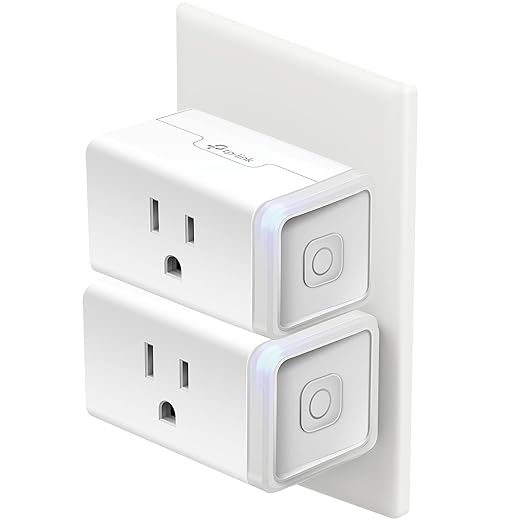

Wemo Mini Smart Plug 2-Pack
Offers broad assistant compatibility—Alexa, Google Assistant, and Apple HomeKit—so it pairs well with Echo Dot, Google Nest Mini, or a HomePod Mini. The compact, stackable design and Away Mode add convenience and safety, though it costs more than basic plugs.
Pros
- Works with Alexa, Google Assistant, and Apple HomeKit (Siri/HomePod Mini)
- Compact stacking design allows two plugs per outlet
- Away Mode randomizes lights for better home security
- No hub required and easy scheduling via the app
Cons
- More expensive than basic smart plugs
- Occasional app or firmware quirks reported by users
- HomeKit setup can be trickier for some users
A versatile plug for mixed-ecosystem homes
The Wemo Mini is built to be flexible: it supports Alexa, Google Assistant, and Apple HomeKit, so you can control it with an Echo Dot, Google Nest Mini, or a HomePod Mini and include it in the corresponding assistant’s routines and automations. The compact body is purposely designed so you can stack two plugs in a single outlet without blocking the second socket.
Standout features and benefits
- Apple HomeKit compatibility for Siri control and Home app automations (works cleanly with HomePod Mini)
- Alexa and Google Assistant support for cross-platform voice control
- Away Mode to randomly toggle lights when you’re out, improving home security
- App scheduling and remote on/off without needing a hub
Practical examples and integration tips
If you use a HomePod Mini, you can include the Wemo Mini in HomeKit scenes and automations (for example, have a bedside lamp turn off when you say "Goodnight" to Siri). With an Echo Dot, add the plug to Alexa routines triggered by voice or schedule. With a Google Nest Mini, you can use Assistant voice commands or Google routines. That breadth makes it a smart choice if you don’t want to be locked into a single assistant.

Limitations and when to choose differently
The Wemo Mini is pricier than no-frills plugs, and some users run into occasional app or firmware hiccups that can be resolved with updates. If you only need a very cheap, Alexa-only option, an Amazon Basics plug might suit you better; if you need the best value and you don’t need HomeKit, the Kasa HS103 is a strong alternative. Choose Wemo when cross-assistant support or HomeKit compatibility matters to your setup.
Kasa HS103 Smart Plug 2-Pack
A compact, reliable smart outlet that adds voice and remote control to any appliance with minimal fuss. It balances features, safety certification, and affordability, making it an excellent starter plug for your smart home.
Pros
- Solid value with two plugs per pack
- UL certified and rated up to 15A
- Works with Alexa and Google Assistant
- Easy setup via Kasa app with scheduling
Cons
- Only supports 2.4 GHz Wi‑Fi
- No Apple HomeKit / HomePod Mini support
- Requires Kasa app for full feature access
Why this plug works for most people
The Kasa HS103 2-pack is aimed at buyers who want a dependable, affordable way to make lamps, fans, or other appliances smart without adding a hub. You get voice control through Alexa or Google Assistant, remote on/off from the app, and scheduling features to automate your day. The newer HS103 versions are UL certified and rated for 15 amps, which covers most household devices.
Key features and practical benefits
- Voice control with Alexa and Google Assistant for hands-free operation
- App-based scheduling, timers, and remote access so you can control devices away from home
- Compact form factor that fits in most outlets without blocking the second socket
- UL certification and 15A resistive rating for safer, higher-load use
How it fits with smart speakers and assistants
If you use an Echo Dot or Google Nest Mini, you'll enjoy tight integration: voice commands, routines, and routine triggers work smoothly with those speakers. If you're using a HomePod Mini or prefer Apple HomeKit, note that this plug does not support HomeKit—so Siri control or Home app automation won't be available. For example, you can say to an Echo Dot, "turn on the living room lamp," and the plug will respond, while the same command via HomePod Mini won't work unless you choose a HomeKit-capable plug.
Real-world use and limitations
You’ll find it excellent for bedside lamps, small fans, holiday lights, and holiday automation where reliability and low price matter. Setup is straightforward: plug in, follow the Kasa app steps, and link Alexa or Google if desired. The main limits are the 2.4 GHz Wi‑Fi requirement and lack of HomeKit support—if you need Apple ecosystem integration, consider a HomeKit-capable alternative such as a Wemo Mini or other HomeKit-certified plug.
Amazon Basics Smart Plug 2-Pack
If you live in the Alexa ecosystem, this plug offers one of the simplest, fastest set ups and tight integration with Echo devices. Its compact form and native Alexa control make routines and hands-free commands seamless, though it’s limited outside Alexa.
Pros
- Zero-touch setup when linked to your Alexa account
- Compact design that doesn't block adjacent outlets
- Native Alexa control and Alexa app management
- Scheduling and routine support via Alexa
Cons
- Works with Alexa only—no Google Assistant or HomeKit
- No built-in energy monitoring
- Requires a 2.4 GHz Wi‑Fi network
Streamlined Alexa-first smart plug
The Amazon Basics Smart Plug is designed to be the easiest plug to use if Alexa is your main assistant. Setup can be near-instant when you choose "Link device to your Alexa account" at checkout or follow the Alexa app prompts after plugging in. Once set up, you control the plug from the Alexa app, include it in routines, and use your Echo Dot for voice commands.
What you get and how it helps
- Native Alexa integration with zero-touch setup options for a speedy start
- Compact single-socket footprint so you can still use the other outlet
- Scheduling, timers, and the ability to add the plug to Alexa Routines for automation
How it pairs with your smart speaker setup
This plug is ideal if you own Echo devices like the Echo Dot because you get consistent voice control and local routines. If you also have a Google Nest Mini or a HomePod Mini, you'll find limited or no compatibility: Nest Mini users will miss native support, and HomePod Mini/Siri users will need a HomeKit plug instead.

Practical notes and limitations
You’ll appreciate the plug for simple smart upgrades—lamp automation, holiday lighting, and small appliances are easy to automate. The tradeoff is ecosystem lock-in: it’s great within Alexa’s world but not suited to multi-assistant homes. Also, if you want energy reports or advanced scheduling beyond Alexa's options, look for a plug with built-in energy monitoring or a more feature-rich app.
Final Thoughts
Top pick: Wemo Mini Smart Plug — If you want one smart plug that plays nicely with Alexa, Google Assistant, and especially Apple HomeKit, the Wemo Mini is the most flexible choice. Its compact, stackable design and Away Mode make it ideal for living rooms, bedside lamps, and any outlet where tidy spacing and HomeKit/Siri control matter. Use Wemo if you own a HomePod Mini or lean into Apple devices, or if you switch between assistants.
Best budget pick: Kasa HS103 — For the most bang-for-your-buck, pick the Kasa HS103. It’s reliable, tiny, and simple to set up with Echo Dot or Google Nest Mini. Choose the Kasa HS103 when you need lots of smart outlets on a budget—think dorm rooms, renter-friendly lamp upgrades, or a first-time smart-home kit.
Buying & Using Smart Plugs: A Practical Guide
Quick setup tips
- Make sure your phone is connected to your router’s 2.4 GHz band during setup—many plugs won’t see 5 GHz.
- Place plugs where they won’t block the second outlet or get covered by furniture. The Wemo Mini’s compact, stackable design helps here.
- If you have an Echo Dot, setup is usually faster with Amazon Basics plugs. If you use a HomePod Mini, prefer HomeKit-capable plugs (Wemo Mini).
What to look for when buying
- Compatibility: Do you need HomeKit (Siri/HomePod Mini), Google Home (Nest Mini), or Alexa (Echo Dot)? Match the plug to your ecosystem. Wemo covers all three; Amazon Basics favors Alexa; Kasa supports Alexa and Google.
- Physical size: Compact plugs let you use both sockets on a duplex. Wemo and Kasa are both space-conscious.
- Extra features: Scheduling, away/vacation modes, and energy monitoring (if you need usage data). Note: many budget plugs like the Kasa HS103 do a great job at scheduling but may not include energy metering.
- Power rating: Look for the amp/watt limit if you plan to control more demanding devices.
Practical use cases and routines
- Lighting: Use smart plugs with table or floor lamps to make simple voice-controlled lighting scenes. Combine with an Echo Dot for hands-free commands.
- Morning routines: Pair a coffee maker on a smart plug with your Nest Mini alarm or HomePod Mini; schedule the plug to turn on 10 minutes after your alarm.
- Vacation security: Use Away Mode or randomized schedules to turn lights on/off while you’re away.
- Media and accessories: Use plugs to power on non-smart speakers or chargers only when needed—good for reducing standby power draw.
Common mistakes to avoid
- Don’t plug high-draw appliances into a standard smart plug. Heaters and large ACs are common failure cases.
- Don’t assume cross-ecosystem voice commands will work the same. For example, Siri shortcuts require HomeKit-compatible plugs like Wemo for the smoothest HomePod Mini experience.
- Don’t ignore firmware updates—manufacturers push security and reliability fixes.
Budget vs. premium: when to spend more
- Buy Kasa HS103 if you want reliable performance without a big outlay. It’s perfect for adding multiple smart plugs quickly.
- Choose Wemo Mini if you need broad ecosystem support and slightly more polish (and don’t mind paying a bit more). It’s the better long-term buy if you use HomeKit or switch assistants.
- Pick Amazon Basics only if your home is Alexa-first and you want the simplest, fastest integration with an Echo Dot.
Final tip: start with two plugs—one in the living room and one in your bedroom. Experiment with routines on your Echo Dot, Google Nest Mini, or HomePod Mini. Once you see the convenience, adding more becomes obvious.
FAQ
Can I use smart plugs with any voice assistant?
Most smart plugs work with Alexa and Google Assistant. A few, like the Wemo Mini, add Apple HomeKit support so they also work with Siri and a HomePod Mini. Amazon Basics plugs are optimized for Alexa, while Kasa plugs pair easily with Alexa and Google. Check the product page if Siri/HomeKit support matters to you.
Are smart plugs safe for heaters or air conditioners?
Not usually. Most consumer smart plugs are rated around 15A or 1800W—okay for lamps, fans, and coffee makers, but not for space heaters, window AC units, or large appliances. Always check the plug’s maximum wattage and the appliance’s label before use.
Do smart plugs need a hub or special Wi‑Fi?
No hub is required for Wemo Mini, Kasa HS103, or Amazon Basics—they connect directly to your home Wi‑Fi. Most require 2.4 GHz networks (not 5 GHz). If you have a dual-band router, make sure your phone is on the same 2.4 GHz network during setup.
Will a smart plug slow down my Wi‑Fi?
Not noticeably. Smart plugs use tiny amounts of bandwidth for status updates and commands. If you have dozens of devices, your router might get taxed; in that case use a mesh system or upgrade your router.
Can I leave a smart plug plugged in all the time?
Yes. They’re designed for continuous use. Still, update firmware when prompted, avoid plugging them into externally damaged outlets, and occasionally reboot your router if you see connectivity drops.
rent smart!
Rent Smart! will help you choose the right smart home devices, skip the expensive mistakes, and enjoy all the convenience without making permanent changes. Build a safer, smarter apartment with renter-friendly devices you can install today and take with you when you move.


