
Google Nest Hub vs Alexa Show 8

Deciding between the Nest Hub and Echo Show 8? See how your Echo Dot’s far-field voice, the HomePod mini’s rich sound and Siri smarts, and the Google Nest Mini’s effortless Assistant routines can each supercharge your smart home experience.
Choose smart fun, not gadget clutter. You’ll get a side-by-side of the Nest Hub (7″) and Echo Show 8.7″, screen, sound, assistants, and privacy. Use Echo Dot for Alexa, HomePod Mini for rich Siri sound, Nest Mini for Google control.
Bedside Assistant
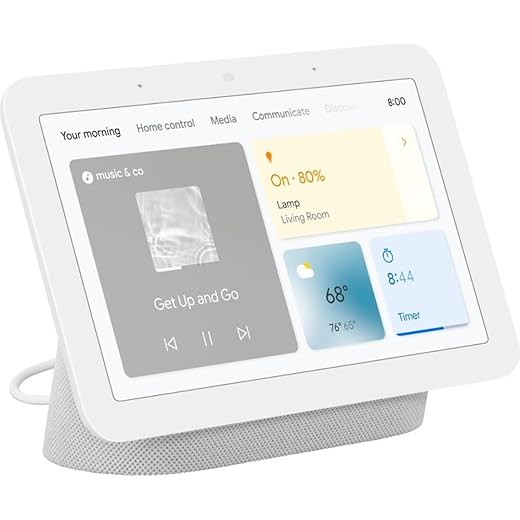
7.9
You get a compact, privacy-minded display that excels in bedroom and kitchen roles, especially if you use Google services. It offers useful sleep sensing and excellent smart-home control, but the smaller screen and modest speaker limit its appeal for media-first setups.
Entertainment Hub
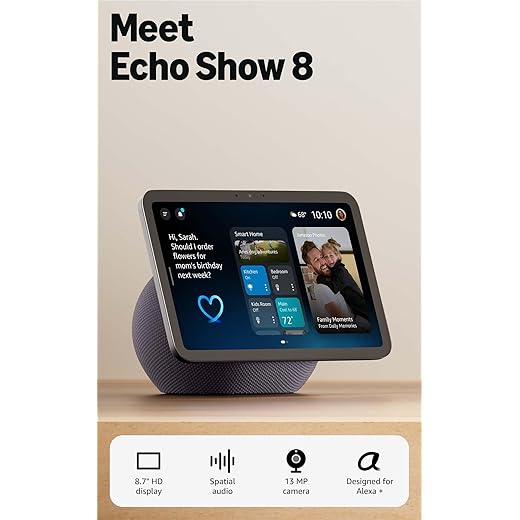
8.8
You get a more media-forward smart display that delivers superior audio, a larger screen, and a capable camera for calls and monitoring. It’s an excellent central hub if you prioritize entertainment and robust Alexa smart-home features, though it comes at a higher cost and is most compelling within Amazon’s ecosystem.
Google Nest Hub
- Sound Quality – 7.5
- Display Performance – 6.5
- Smart Home Integration – 9
- Voice Assistant & Features – 8.5
Echo Show 8
- Sound Quality – 9
- Display Performance – 8.5
- Smart Home Integration – 9
- Voice Assistant & Features – 8.8
Google Nest Hub
Pros
- Compact design fits easily on nightstands and counters
- Sleep Sensing and helpful Google-specific features
- Strong Google Assistant integration and broad service support
- Affordable value with multi-language and global support
Echo Show 8
Pros
- Larger, vibrant 8.7″ display great for video and recipes
- Room-filling spatial audio with stronger bass and clarity
- Auto-framing camera and powerful Alexa+ features for calls and personalization
- Built-in smart home hub and advanced sensing (Omnisense)
Google Nest Hub
Cons
- No camera for video calls or visual monitoring
- Speaker and display are less powerful than larger smart displays
Echo Show 8
Cons
- Higher price than smaller displays
- Tighter integration with Amazon ecosystem may limit some cross-platform features
Design, screen and hardware: size, build and daily use
Size, screen and bezels
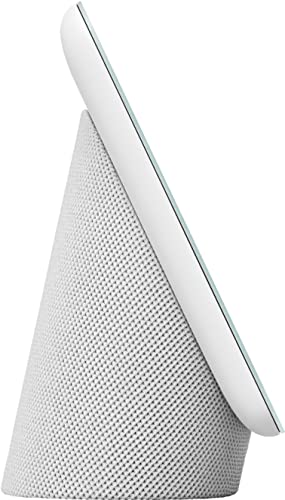
The Nest Hub uses a 7″ 1024×600 display with slim bezels and a compact 4″ footprint — it’s built to disappear on a nightstand or kitchen counter. The Echo Show packs an 8.7″ vibrant HD panel (more viewing area) with a slightly thicker chassis and bigger footprint, which makes text and video easier to see from across a room. Bigger screen = better recipe steps, clearer video calls and more immersive streaming; smaller screen = less countertop real estate and subtler presence.
Color, materials and room fit
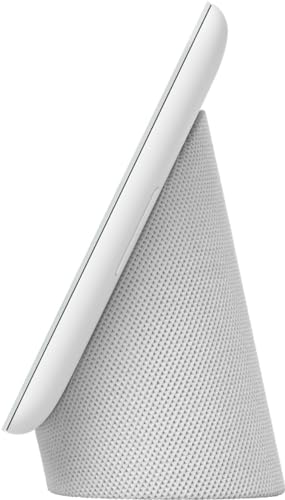
Nest Hub (Chalk) uses soft fabric and a light neutral tone that blends into bedrooms and bright kitchens. Echo Show (Graphite) uses a darker, more modern finish that suits living rooms and media centers. Materials on both feel premium; pick Chalk if you want it to recede, Graphite if you want a statement piece.
Speakers, microphones, ports and privacy
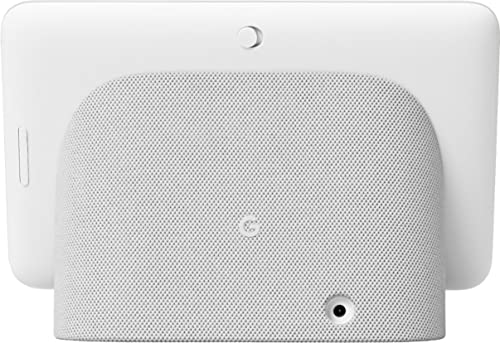
- Nest Hub: rear full-range speaker, single mic with physical mic switch, no camera — great for privacy and bedside use.
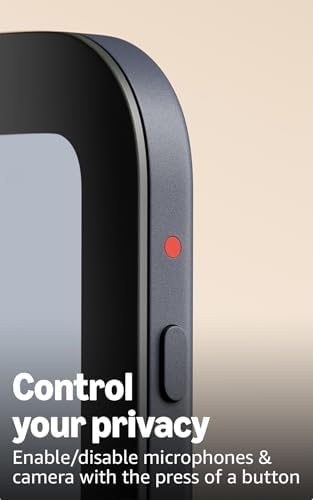
- Echo Show 8: front-firing spatial audio array, multiple mics, auto-framing camera with shutter and mic/camera disable — better for video calls and live check-ins but more visible sensors.

Both plug into power (no battery use). Nest Hub lists a single USB/service port; Echo Show uses its supplied power adapter and includes on-device buttons for volume and mic/camera control.
Extra small speakers to pair
If you want multi-room audio or extra voice access, add:
- Echo Dot — compact Alexa speaker, cheap and great as an additional room mic/speaker.
- HomePod Mini — best Siri sound quality and tight Apple ecosystem integration.
- Google Nest Mini — small, affordable Google Assistant extension that pairs naturally with Nest Hub.
Feature Comparison
| Features | Google Nest Hub | Echo Show 8 |
|---|---|---|
| Price | $$ | $$$ |
| Screen Size | 7 inches | 8.7 inches |
| Display | LED touchscreen, 16:9 aspect | Vibrant HD touchscreen with increased viewing area |
| Display Resolution | 1024 x 600 | Vibrant HD (device-optimized resolution) |
| Camera | No camera (privacy-focused) | Centered camera with auto-framing and 3.3x zoom |
| Speaker System | Full-range single driver (1.7 in) | Spatial audio with enhanced bass and wider soundstage |
| Smart Home Hub | Works with Google Nest ecosystem; controls compatible devices | Built-in hub with Omnisense for presence, temp & visual routines |
| Voice Assistant | Google Assistant | Alexa (Alexa+ features available) |
| Unique Feature | Sleep Sensing and Sunrise Alarm | Omnisense technology and Alexa+ personalization |
| Sleep Tracking | Yes — built-in Sleep Sensing | No built-in sleep sensing like Nest Hub |
| Privacy Controls | Physical mic switch and easy data controls | Microphone & camera disable buttons and dedicated camera controls |
| Connectivity | Wi‑Fi (802.11ac), Bluetooth, USB port | Wi‑Fi, Bluetooth, built-in smart home protocols |
| Supported Services | YouTube, Netflix, Google Photos, Google services | Prime Video, Netflix, Alexa services, photo slideshow features |
| Best For | Google users wanting a compact bedside/kitchen display | Alexa users who want a media-first smart display and strong smart-home control |
| Warranty | 90-day manufacturer warranty | Manufacturer warranty varies by region |
| Compact speaker alternatives | Echo Dot: budget Alexa speaker with voice control; HomePod Mini: tight integration and spatial audio for Apple users; Google Nest Mini: compact, affordable Google Assistant speaker — choose based on your ecosystem. | Echo Dot: budget Alexa speaker with voice control; HomePod Mini: tight integration and spatial audio for Apple users; Google Nest Mini: compact, affordable Google Assistant speaker — choose based on your ecosystem. |
Audio, video and performance: media, calls and responsiveness
Sound and spatial audio
The Echo Show 8’s spatial audio and larger drivers deliver noticeably fuller, bass-forward playback — music and soundtrack details open up across the room. The Nest Hub’s tuned single full-range speaker is clearer at voice frequencies (podcasts, narration) and excels at bedside listening or close-range kitchen use. You can expand either ecosystem with small speakers: an Echo Dot adds another Alexa room mic/speaker, a Google Nest Mini extends Assistant reach, and a HomePod mini gives tight, punchy Apple-quality sound when you use AirPlay.

Display clarity and touch
The Show 8’s 8.7″ vibrant HD panel shows recipe steps and streaming video with better legibility from across a kitchen. Nest Hub’s 7″ 1024×600 screen is perfectly usable at arm’s length — touch targets are responsive and fast for swiping through steps or timers.
Voice recognition and latency
Echo Show’s multi-mic array and beamforming pick out “Alexa” in noisy kitchens more reliably than the Nest Hub’s single mic; expect fewer repeat prompts while pots are simmering. Both devices respond in under a second for simple queries; the Echo Show edges out in complex tasks (multi-step Alexa+ routines).


Processor, RAM and real-world responsiveness
Nest Hub (ARM quad-core 1.9 GHz, 4 GB RAM) feels snappy for media and control. The Echo Show’s AZ3 Pro chip is tuned for heavier multimedia (spatial audio, auto-framing video calls) and multitasking — switching apps and camera framing is smoother. For your use cases:
- Playing a playlist: Echo Show fills the room; Nest Hub is crisp nearby.
- Streaming a recipe video while cooking: Echo Show wins for readability; Nest Hub is less obtrusive and still responsive.
- Joining a video call: Echo Show’s auto-framing and noise reduction make calls feel more natural; Nest Hub lacks a camera (audio-only Duo).
Assistant, smart home and ecosystem: compatibility and extra smart speakers
Assistant differences: Google Assistant vs Alexa
Google Assistant favors natural-language search and context — it’s better for follow-up questions, maps, personal Google data (Calendar, Gmail) and conversational queries. Alexa excels at task automation, shopping, and third‑party “Alexa+” features (skills). Routines: both let you chain actions, but Alexa’s routine editor and third‑party skill ecosystem are broader; Google’s routines are generally simpler and more conversational. Third‑party integrations: Alexa has more consumer skills; Google Actions are tighter with Google services and search.
Smart‑home support: Matter, Zigbee and brands
- Matter: Both devices support Matter (reduces cloud dependence and simplifies device setup).
- Zigbee: Echo Show 8 includes a built‑in Zigbee hub for local pairing (Philips Hue, Sengled, some Aqara). Nest Hub does not include Zigbee — it relies on Wi‑Fi, Bluetooth, Thread (via Nest devices) and Matter bridges.
- Popular brands: Nest Hub works seamlessly with Google Nest thermostats/cameras and Chromecast TVs; Echo Show pairs directly with Ring, many Zigbee lights, and Amazon smart‑home services.
Ecosystem advantages
- Nest Hub + Nest Mini: Use broadcast, multi‑room groups, synchronized alarms, and Thread/Matter via Nest devices; great if you use Gmail, Google Calendar, Chromecast and YouTube.
- Echo Show 8 + Echo Dot: You get Drop In, auto‑framed video calls, a local Zigbee hub, and broader shopping/third‑party integrations for Alexa+.

Companion speaker comparison: Echo Dot vs HomePod mini vs Nest Mini
- Sound: HomePod mini > Echo Dot > Nest Mini (tight, punchy Apple sound vs fuller Alexa vs clear voice‑forward Google).
- Multi‑room: All support multi‑room; HomePod uses AirPlay 2, Echo uses Amazon multi‑room, Nest uses Chromecast.
- Voice recognition: Echo Dot has strongest far‑field pickup; Nest Mini is good nearby; HomePod mini is excellent in iOS homes.
- Pricing & when to add: Nest Mini for inexpensive Assistant reach; Echo Dot if you want Alexa everywhere and Zigbee hub expansion; HomePod mini if you’re deep in Apple (Handoff, Siri, iCloud).
Mixing ecosystems works but expect broken cross‑assistant routines, duplicated devices and fragmented privacy controls — pick a primary assistant for consistency.
Setup, privacy, value and who each device is best for
Unboxing, setup and daily management
You’ll unbox, plug in and follow on‑screen prompts. For Nest Hub use the Google Home app; for Echo Show use the Alexa app. Typical steps: connect to Wi‑Fi, assign a room, sign into your account, enable voice match/Voice Profiles, and link streaming services. Daily controls: use the companion app for routines, do‑not‑disturb, firmware updates, and multi‑room groups. Troubleshooting quick fixes: reboot the device, move it closer to the router, or re‑run setup in the app. Factory reset options are in-device or in-app if you need a full wipe.
Privacy controls
- Google Nest Hub: no camera (good for bedrooms), physical mic mute switch, clear voice history in Google Account or auto‑delete settings.
- Echo Show 8: physical camera shutter and mic/camera mute button, per‑device privacy settings in the Alexa app, and options to review/delete voice recordings.
- Echo Dot / Nest Mini / HomePod mini: all include microphone mute toggles for privacy control.
Value, sales and subscriptions
- Typical Amazon pricing: Nest Hub ≈ $120, Echo Show 8 ≈ $180; both frequently drop during Prime Day/holidays.
- Subscriptions to consider: YouTube/YouTube Premium for ad‑free video (Nest Hub), Amazon Prime/Prime Video and Amazon Photos (Echo Show), Amazon Music Unlimited for full Alexa audio, and Apple Music if you lean Apple.
- Companion speakers: Nest Mini (cheap Assistant extension), Echo Dot (adds Alexa rooms and can expand a Zigbee network), HomePod mini (best for AirPlay 2, Siri, and iOS features).
Who should buy which
- Prioritize audio: Echo Show 8 (spatial sound) or HomePod mini + Apple ecosystem.
- Video calls & personalization: Echo Show 8 (auto-framing camera).
- Smart‑home centralization: Echo Show 8 (built‑in Zigbee hub) if you want local device pairing.
- Maximum privacy / bedroom use: Google Nest Hub (no camera, simple mic mute).
- Already in an ecosystem: pick Google for Gmail/Chromecast, Amazon for Prime/Alexa+ features, Apple (HomePod mini) for tight iPhone/HomeKit integration.
Final verdict: pick by ecosystem and priorities
Pick the Echo Show 8 if you want a larger HD display, spatial audio, and tight Alexa/Prime integration—it’s the winner for media. Choose the Nest Hub if you prefer a camera‑free display, Google Assistant’s superior search and Google ecosystem synergy.
For small‑speaker needs, Echo Dot offers cheap Alexa access, HomePod mini gives premium Apple sound and Siri, and Google Nest Mini is the budget Google Assistant hub. Which priority wins for you now?
rent smart!
Rent Smart! will help you choose the right smart home devices, skip the expensive mistakes, and enjoy all the convenience without making permanent changes. Build a safer, smarter apartment with renter-friendly devices you can install today and take with you when you move.


