
Top 3 Smart Bulbs for Your Home

Which bulb will turn your home from ‘meh’ to ‘movie-set’—and which one will just light the laundry room?
Light changes everything. A single smart bulb can make your living room cozy, your kitchen productive, or your hallway actually pleasant to pass through.
Think of smart bulbs as tiny mood DJs: color, brightness, and automation all in one little package. You don’t need to be a tech nerd to get dramatic results—just the right bulb in the right place.
Our Top Picks


Philips Hue Essential Color A19 4-Pack
Offers the most mature app, seamless scene libraries, and the largest accessory ecosystem for gradual smart lighting upgrades. It delivers reliably smooth dimming and superb integration with voice platforms, though unlocking the fullest feature set often means adding a Hue Bridge.
Pros
- Robust Hue ecosystem and accessory support
- Smooth dimming and reliable color transitions
- Large library of professionally designed light scenes
- Seamless voice control across Alexa, Google, and Siri/HomeKit
Cons
- Higher price than many rivals
- Full feature set often requires a Hue Bridge
- 800 lumens is modest compared with some high-output bulbs
Why choose Hue Essentials?
This 4-pack is an easy entry point into the Philips Hue ecosystem: you get accurate colors, smooth dimming, and a huge library of scenes that designers and gamers alike use to change the look and feel of a room. Hue’s long-standing platform is the best choice if you plan to expand with switches, sensors, or light strips.
What you get and how it helps
- Full color and tunable white (2200K–6500K) with smooth dimming down to ~2%
- Instant access to curated scenes and presets in the Hue app
- Works with Alexa, Google Assistant, and Apple HomeKit (HomePod Mini friendly)
- Expandable: add a Hue Bridge for richer automations, security integrations, and entertainment sync
The result is a highly polished experience: colors transition smoothly, scenes feel intentional, and automations are flexible once a Bridge is added. If you already use smart home gear, Hue's interoperability pays off over time.
Voice assistants and pairing notes
Hue integrates with the major voice platforms, and each assistant gives you slightly different conveniences:
- Echo Dot (Alexa): Native Hue skills provide broad voice control, groups, and routine triggers.
- HomePod Mini (Siri/HomeKit): Excellent HomeKit support when bulbs are added to Home, offering secure local control and Siri shortcuts.
- Google Nest Mini (Google Assistant): Full voice commands and scene recall using the Google Home app.
Because Hue works well across these platforms, you can pick the speaker or ecosystem you prefer and still enjoy a polished experience. If you use HomeKit primarily (HomePod Mini), Hue’s HomeKit compatibility is especially seamless.
Limitations and practical advice
Philips Hue bulbs are some of the most capable, but that comes with cost. The bulbs in this pack are 800 lumens each—adequate for many fixtures but dimmer than higher-output alternatives. If you want advanced entertainment features (light sync with movies/games) or whole-house automations, factor in the Hue Bridge cost. For a newcomer who values a smooth app, wide accessory choice, and long-term expandability, this is the industry-standard solution.
Govee 1600-Lumen A21 Smart Bulb 2-Pack
Combines very high lumen output with strong color accuracy (CRI 90+) and Matter compatibility, making it ideal for rooms that need powerful, true-to-life lighting. It’s excellent for task lighting and immersive color scenes, but the large A21 size and lack of dimmer-switch compatibility are practical caveats to consider.
Pros
- Powerful 1600 lumens — great for task lighting
- High CRI (90+) for accurate colors
- Wide tunable white range (1000K–10000K) and RGBWW colors
- Matter, Alexa, and Google compatibility; music sync for entertainment
Cons
- A21 form factor is larger and may not fit all fixtures
- Not compatible with standard wall dimmer switches
- 2.4GHz-only connectivity (no 5GHz)
What makes this Govee bulb stand out
If you need bright, color-accurate lighting for a living room, workspace, or creative studio, this A21 delivers where most A19 bulbs can’t. The 1600-lumen output plus CRI 90+ gives you usable task light while keeping colors looking natural—helpful for cooking, crafting, or streaming setups.
Features and real-world benefits
- 1600 lumens of white brightness — strong enough for general and task lighting
- LuminBlend+ color tech for consistent color across brightness levels
- Wide color temperature range and RGBWW for flexible scenes
- Matter, Alexa, Google, and SmartThings compatibility; music-sync mode to match audio
You’ll notice the difference when you switch from a standard 800-lumen bulb: colors pop more accurately, and a single bulb can light larger fixtures or rooms. The music sync and preset scenes make it fun for parties or mood lighting, while schedules and routines keep it practical for everyday use.
Voice assistant compatibility and tips
These bulbs work smoothly with common smart speakers, so you can choose the voice assistant that fits your home:
- Echo Dot (Alexa): Use for voice-controlled brightness and color changes, plus integration in Alexa routines.
- HomePod Mini (Siri/HomeKit via Matter): Use Matter or HomeKit for Siri control and reliable local automation.
- Google Nest Mini (Google Assistant): Quick voice control and integration with Google routines and groups.
Because the bulb supports Matter, you gain more reliable local control across these assistants and easier multi-admin access if different family members use different platforms.
Practical considerations
The trade-offs are mostly physical and compatibility-related: the A21 shape is taller and wider than A19 bulbs, so check your fixtures for clearance. It’s explicitly not rated for use with standard wall dimmers, so use app- or voice-based dimming instead. If you need the absolute brightest, most accurate lighting for work or entertainment without stepping into commercial fixtures, this is a compelling, versatile choice.
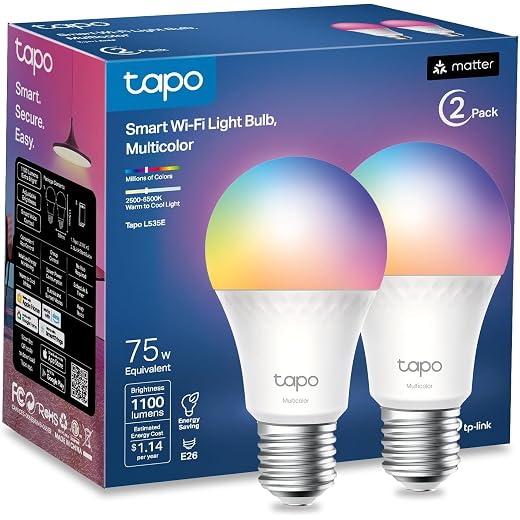
Tapo L535E 1100-Lumen Matter Bulb
Delivers bright output and accurate color for its price, with broad platform compatibility and Matter support for local control. It’s a sensible pick if you want strong brightness and color options without paying a premium, though the app and advanced features aren’t as refined as flagship offerings.
Pros
- Very bright 1100 lumens (75W equivalent)
- Matter-certified for reliable local control
- High CRI (>90) for truer colors
- Millions of colors and tunable white with dimming
- Affordable 2-pack gives great value
Cons
- App can be basic compared with premium ecosystems
- Build is utilitarian plastic rather than premium finish
- Limited advanced integrations compared to Hue ecosystem
Who this bulb is for
If you want a bright, budget-friendly color bulb that plays well with modern smart home standards, this is a sensible choice. It’s aimed at users who prioritize brightness and compatibility (Matter, Alexa, Google, and HomeKit) over premium app extras or top-tier ecosystem features.
Key features and what they mean for you
- Matter-certified for cross-platform reliability even when internet is spotty
- 1100 lumens of white brightness (brighter than many color A19 bulbs)
- High CRI (>90) for better color rendering
- Millions of RGBW colors plus tunable white (2500K–6500K) and 1–100% dimming
- Works with Siri, Alexa, Google Assistant and the Tapo app
Those features mean you can use it for everyday task lighting as well as mood scenes. The high lumen output makes it usable in areas that need more light—kitchens, home offices, or living rooms—while the high CRI helps colors look more natural under the bulb.
Voice assistants and practical use
You can control the bulb hands-free using common smart speakers and hubs. For example:
- Echo Dot (Alexa): Use voice commands, routines, and Alexa groups to control brightness and color.
- HomePod Mini (Siri/HomeKit via Matter): Pair through Matter/HomeKit for local control and tight Siri integration.
- Google Nest Mini (Google Assistant): Voice control and integration with Google routines and Home app.
This cross-assistant compatibility is one of the bulb’s strengths—you aren’t locked into a single voice platform, and Matter support improves local reliability and multi-admin control.
Real-world benefits and limitations
In everyday use you’ll appreciate the strong output and accurate colors: reading, cooking, and video calls are clearer under 1100 lumens and CRI 90+. The app enables scheduling and remote control, but power users may notice fewer advanced automation and entertainment-sync options than premium ecosystems. If you want a straightforward, bright color bulb that won’t break the bank, this is a pragmatic pick. If you need the most polished app features or the tightest ecosystem-driven effects, you may prefer a higher-end option.
Final Thoughts
Pick the Philips Hue Essential Color A19 if you want the most mature, expandable smart-lighting platform. It’s the best choice when you want a polished app, deep scene libraries, and the ability to grow your setup over time—perfect for whole-home installs and people who love automations and accessories (get the Hue Bridge to unlock the full experience).
Choose the Govee 1600-Lumen A21 if you need serious, color-accurate light for tasks or media. With very high lumen output and CRI 90+, it’s the top pick for desks, kitchens, and immersive color scenes where brightness and accurate tones matter. If budget is tight but you still want Matter compatibility, the Tapo L535E is a sensible runner-up: good color and value, even if it lacks some polish of the flagships.
Smart Bulb Guide: Tips, Integrations, and Buying Advice
How to choose the right bulb for the room
- Living room / whole-home: Philips Hue Essential Color A19. Prioritize expandability, scenes, and elegant app control. Add a Hue Bridge if you plan more than a few bulbs or want advanced automations.
- Task areas (kitchen, desk): Govee 1600‑Lumen A21. High lumen output + CRI 90+ = bright, accurate light that helps you see details and colors clearly.
- Budget or mixed setups: Tapo L535E. Matter-certified, bright, and wallet-friendly—great for bedrooms or rooms where you want color but don’t need a premium app.
Voice assistants and ecosystem tips
- Echo Dot (Alexa): Works well with all three brands. Use Alexa routines to tie lights into alarms, motion sensors, or scenes.
- Google Nest Mini (Google Assistant): Great for quick voice control and Google Home routines. Matter support improves cross-brand scene reliability.
- HomePod Mini (Siri): Best experience with Hue + Hue Bridge today. Matter is expanding Siri support, so expect smoother integration for Tapo and Govee over time.
Practical setup & scene ideas
- Group bulbs by room for single-command control (e.g., "Living Room — Movie").
- Use schedules: warm dim in the evening (2700K), cool and bright in the morning (4000–5000K).
- Try dynamic scenes: slow color temperature shifts for wake-up routines, or synchronized color scenes for parties.
Care, maintenance, and longevity
- Keep firmware updated. Brands push performance and Matter fixes via software.
- Avoid extreme heat. Enclosed fixtures can shorten bulb life—look for bulbs rated for enclosed fixtures if that’s your setup.
- Clean gently. Power off, then wipe with a dry cloth to remove dust; no liquids near electronics.
Common mistakes and how to avoid them
- Don’t mix physical dimmers with non-dimmable smart bulbs—replace the switch with a compatible smart switch or use app-based dimming.
- Don’t buy only one brand if you plan to expand universally; check Matter compatibility to keep future brand choices open.
- Don’t underestimate lumens. For task lighting, aim for 800–1600 lumens depending on the fixture and task.
Budget vs premium: what you pay for
- Premium (Philips Hue): superior app polish, large accessory ecosystem (sensors, switches), and more reliable multi-device scenes. Good when you want a long-term, whole-home system.
- Mid/Budget (Govee, Tapo): excellent value for brightness and color; Matter support narrows the gap for ecosystem flexibility. Choose these if you prioritize performance per dollar or want quick wins in select rooms.
If you want help matching bulbs to specific rooms in your home (e.g., living room layout, ceiling height, fixture types), tell me the room sizes and I’ll recommend exact bulb counts and color temperatures.
FAQs
Do I need a hub or bridge for these bulbs to work?
Not always. The Philips Hue bulbs offer the best experience with a Hue Bridge (for advanced scenes, routines, and reliability), though basic control via Bluetooth or a Hue app is possible for a few bulbs. Govee and Tapo bulbs support Wi‑Fi and Matter, so you can use them without a hub—just ensure your smart home controller or phone supports Matter if you want local control across ecosystems.
Will these bulbs work with my Echo Dot, HomePod Mini, or Google Nest Mini?
Yes. Echo Dot (Alexa) pairs naturally with Philips Hue, Govee, and Tapo through their integrations or via Matter. Google Nest Mini (Google Assistant) also supports all three, especially via Matter or native integrations. For HomePod Mini (Siri), Philips Hue is the smoothest option and works best when paired to the Hue Bridge; Matter support is expanding Siri compatibility for third-party bulbs.
Is Matter support actually useful or just marketing?
Matter is genuinely helpful: it standardizes local control so devices from different brands work together more reliably. If you plan to mix brands (Hue bulbs, Govee strips, a Google speaker), Matter reduces headaches and makes voice and routine triggers faster and more dependable.
Which bulb is best for reading or desk work?
Go for the Govee 1600‑Lumen A21. Its high lumen output and CRI 90+ produce bright, true-to-life light that reduces eye strain. Use a neutral color temperature (around 4000K) for focus and 2700K–3000K for relaxed reading.
Can I keep my old wall dimmer with these smart bulbs?
Be careful. Many smart bulbs (especially those designed for full brightness like the Govee A21) aren’t compatible with older mechanical dimmer switches and can flicker or behave oddly. Use the bulb’s software dimming via app, smart switch, or replace the dimmer with a smart switch explicitly made for LED/smart bulbs.
rent smart!
Rent Smart! will help you choose the right smart home devices, skip the expensive mistakes, and enjoy all the convenience without making permanent changes. Build a safer, smarter apartment with renter-friendly devices you can install today and take with you when you move.


