
Top 3 Smart Door Locks for Apartments

Which smart lock will save you from juggling keys, roommates, and grocery bags?
Locked out? It happens — you fumble with keys and everyone’s watching. Smart locks turn that awkward moment into a five-second tap (or fingerprint).
You want security, convenience, and something your landlord won’t hate. These three picks give you retrofit ease, strong biometrics, or true phone‑free access — without turning your door into a DIY nightmare.
Our Top Picks


Aqara U200 Retrofit Smart Lock Keypad
You’ll appreciate seamless Apple Home Key support and a fast, highly accurate fingerprint sensor if you’re deep in the Apple ecosystem. The retrofit design keeps your original deadbolt while delivering premium biometrics and multiple unlocking options.
Pros
- Supports Apple Home Key and fast fingerprint unlocking (<0.3s)
- Retrofit design preserves existing deadbolt—ideal for renters
- Rechargeable interior battery plus separate keypad batteries for redundancy
- Advanced passcode options (anti‑peep, one‑time codes) and multiple unlock methods
Cons
- Apple Home Key features require a Thread‑enabled Apple hub (HomePod/HomePod mini/Apple TV)
- Higher price point than some retrofit alternatives
- Bluetooth/NFC‑centric controls may need a hub for full remote access
Overview
This lock targets users who want a premium, Apple‑friendly retrofit solution. It adds fingerprint, passcode, NFC options and Apple Home Key support to your existing deadbolt while keeping installation non‑destructive—perfect if you rent or prefer not to change your cylinder.
Standout features and real‑world benefits
- High‑resolution fingerprint sensor (160×160) with sub‑0.3s recognition and very low false acceptance rate
- Apple Home Key and NFC compatibility for tap‑to‑unlock with iPhone and Apple Watch (requires a Thread‑enabled Apple hub)
- Dual power approach: a rechargeable battery inside and AAA‑powered exterior keypad for reliable uptime
- Flexible passcodes (one‑time, scheduled, anti‑peep) and Bluetooth app controls for convenience
If you use Apple devices, the Home Key integration makes locking and unlocking feel native: tap your iPhone or use Siri to open the door hands‑free. The fingerprint sensor is noticeably responsive in tests and the variety of unlocking methods gives you fallback options (physical key, code, Bluetooth). For renters or those who like to keep original hardware, the retrofit approach is elegant and reversible.
Considerations and setup tips
- To unlock the full Apple Home Key experience you’ll need a Thread‑enabled hub—plan for that if you don’t already own one.
- Bluetooth control works well for local setup and configuration, but remote access or automations may require bridging with a hub or gateway.
- The price is higher than some retrofit competitors, but the biometric accuracy and Apple integration justify the premium if those features matter to you.
Overall, this lock is an excellent pick if you prioritize biometric speed and Apple ecosystem features while keeping a non‑invasive installation. It’s especially well suited to Apple users who want a secure, modern entry experience.
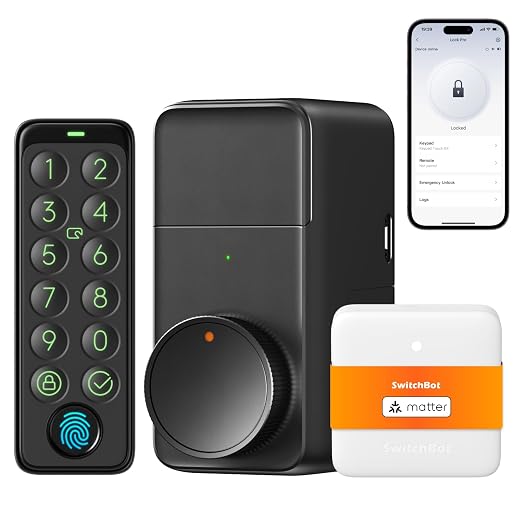
SwitchBot Lock Pro Bundle Matter
You get a full retrofit smart lock bundle that brings Matter, HomeKit/Siri and voice unlock to many deadbolts without drilling. The inclusion of a Hub Mini and fingerprint keypad gives strong value for the price, especially if you want wide smart‑home compatibility.
Pros
- Includes Hub Mini (Matter enabled) for HomeKit and Siri support
- Fingerprint keypad plus up to 15 unlocking methods for flexibility
- No‑drill retrofit keeps your original deadbolt intact—tenant friendly
- IP65 rating offers better weather resistance for exposed doors
Cons
- Some lock types (Jimmy Proof, mortise) require extra accessories
- Fingerprint performance varies by user and environment
- Battery life (6–9 months) depends heavily on usage patterns
Overview
This bundle is focused on compatibility and flexibility: a retrofit deadbolt actuator, a touchscreen fingerprint keypad, and a Hub Mini that brings Matter and remote control. If you want voice commands with Siri, Alexa or Google and the convenience of biometric unlocking, this package aims to cover those bases without a high price tag.
Key features and what you’ll use them for
- Matter support via the included Hub Mini for robust smart‑home integration
- Fingerprint Keypad Touch for fast biometric entry and a range of passcode options
- No‑drill retrofit design that preserves your existing deadbolt and door hardware
- Auto‑Lock, real‑time notifications and activity logs in the app
The bundle is great when you want a modern smart lock experience but don’t want to alter door hardware. Voice unlock with HomeKit or Google Assistant is handy when your hands are full, and the activity log helps you track who came and went. For renters, the no‑drill install is a big advantage—you can usually remove it without leaving a trace.
Practical tips and limitations
- Check deadbolt compatibility before you buy; some less‑common cylinders need extra parts or support help.
- Expect battery replacement every several months under normal use; consider the optional Dual Power Pack if you prefer fewer battery changes.
- Fingerprint readers are fast but can be affected by wet or dirty fingers—keep fingers and sensor clean for best performance.
If you value broad smart‑home interoperability (Matter) and a mix of unlocking options at a modest price, this bundle is one of the most compelling choices for apartments.
Yale August Wi‑Fi Smart Lock Keypad
You get an easy, no‑hub smart lock experience with built‑in Wi‑Fi and a separate keypad that can be placed within Bluetooth range. It’s a practical choice if you want reliable remote access and simple guest scheduling without replacing your existing deadbolt.
Pros
- Installs over existing deadbolt—no rekeying or replacement
- Built‑in Wi‑Fi (no separate hub required) for remote control
- Included keypad enables phone‑free entry and temporary codes
- Auto‑Lock/Auto‑Unlock and DoorSense improve daily convenience and security
Cons
- Exterior fingerprint or biometric unlocking not available
- Keypad range limited by Bluetooth—placement matters
- Advanced smart‑home integrations may be more limited than Matter‑enabled rivals
Overview
If you want to add smart access to your apartment without ripping out hardware, this model gives you keyless convenience while keeping your existing keys. The lock body mounts on the inside of your door and works with the included keypad so you can use codes instead of a phone when needed.
Key features and benefits
- Installs over most single‑cylinder deadbolts—no complex wiring or rekeying needed
- Built‑in Wi‑Fi for remote control and 24/7 activity feed
- Auto‑Unlock as you approach, Auto‑Lock and DoorSense for automated security
- Included keypad supports temporary and scheduled access codes
You’ll appreciate that everything required for core smart features is in the box: the interior lock, keypad, batteries and mounting hardware. Because the keypad can sit anywhere within Bluetooth range, you can place it where it’s most convenient—for example, mounted just inside a covered entry or on a nearby wall for quick code entry. Use the access schedule feature to grant recurring access to a dog walker or cleaning service without sharing your keys.
Practical considerations and limitations
- Battery powered: keep an eye on low battery alerts to avoid lockouts; the keypad and interior unit use replaceable batteries.
- No biometric unlocking: if you prefer fingerprint unlocking you’ll need a different model.
- Bluetooth range: if you place the keypad too far from the lock, code entry may be inconsistent—test placement during installation.
Overall, this lock offers a balanced set of smart features for apartment residents who want simple, phone‑free access and dependable remote monitoring without changing their deadbolt. It’s especially useful when you want straightforward installation and the convenience of built‑in Wi‑Fi without adding a hub.
Final Thoughts
Pick the Aqara U200 Retrofit Smart Lock Keypad if you live deep in the Apple ecosystem and want the best fingerprint performance plus native Apple Home Key support. It keeps your existing deadbolt, gives fast biometrics, and feels premium — ideal if you value seamless HomeKit integration and a clean retrofit install.
Choose the SwitchBot Lock Pro Bundle Matter if you want the broadest smart‑home compatibility and voice control today and tomorrow. The Hub Mini and Matter support make it the best fit if you mix ecosystems (HomeKit, Google, Alexa) or plan to expand other Matter devices. It’s the practical choice for tech-savvy renters who want voice unlock and wide interoperability.
If you need a simple, no‑hub solution with built‑in Wi‑Fi and easy guest scheduling, the Yale August Wi‑Fi Smart Lock Keypad is the pick for phone‑free, keyless convenience — especially useful if you share access frequently with guests, cleaners, or delivery services.
Buying & Setup Guide: What actually matters when picking a smart lock
Start by checking your deadbolt and door. Most retrofit locks fit standard single‑cylinder deadbolts, but you should:
- Measure backset (distance from edge of door to center of the deadbolt).
- Confirm the thumbturn won’t hit a nearby mail slot or glass.
- Make sure interior clearance allows the retrofit unit to sit flat.
Compatibility with smart home platforms
If you already use HomeKit, prioritize Aqara U200 for native Apple Key support and the smoothest Apple integration. If you want the future‑proof flexibility to mix assistants, SwitchBot Lock Pro with Matter support is best — it plays nicely across ecosystems. Choose Yale August if you want zero hubs and immediate Wi‑Fi remote access.
Installation and landlord concerns
These locks are retrofit by design, so installation is usually a quick swap on the interior side. For rentals:
- Keep your original deadbolt in place (you will).
- Document the install with photos so you can restore the original when you move.
- Read building rules — some landlords require notice but often allow non‑destructive upgrades.
Security, privacy, and everyday reliability
Think in layers: keypad or fingerprint + app + physical key backup. Practical tips:
- Use strong, unique PINs and change them occasionally.
- Turn on activity logging to see who unlocks and when.
- Keep firmware updated to patch security issues.
- For fingerprints, enroll multiple fingers and add trusted users with PIN fallback.
Battery life, maintenance, and placement
Expect months of battery life under normal use. Keep these habits:
- Replace batteries proactively when the app warns you.
- Place keypads where they won’t be exposed to direct weather if they’re outside the threshold.
- Test emergency power options and keep a physical key handy if your door has one.
Quick comparison
| Feature | Aqara U200 | SwitchBot Lock Pro Bundle | Yale August Wi‑Fi Keypad |
|---|---|---|---|
| Retrofit (keeps deadbolt) | Yes | Yes | Yes |
| Fingerprint sensor | Yes (fast) | Included in keypad | No |
| Native Apple Home Key | Yes | Via Matter/HomeKit bridge | Limited |
| Built‑in Wi‑Fi (no hub) | Depends on setup | No (Hub included) | Yes |
| Best for | Apple users & biometrics | Matter & voice control | Phone‑free, no hub convenience |
Bottom line: check your door, pick the ecosystem match (Apple → Aqara, cross‑ecosystem → SwitchBot, simple Wi‑Fi → Yale), and plan for battery backups and guest codes. With the right retrofit lock, you’ll spend less time fumbling at the door and more time doing whatever you were hurrying to do in the first place.
FAQ
Can I install these without drilling or changing the deadbolt?
Yes. All three are retrofit designs that attach to the interior side of your existing deadbolt. You won’t need to replace the entire lock or drill new holes, which makes them great for rentals and quick installs.
Which one works best with Apple devices?
Aqara U200 is the clear winner for Apple users — it supports Apple Home Key and integrates tightly with HomeKit. SwitchBot Pro also supports HomeKit via Matter, but Aqara’s fingerprint and Home Key support give it an edge for native Apple experiences.
Do I need a hub for remote access?
It depends. Yale August has built‑in Wi‑Fi so no hub is required for remote access. SwitchBot Lock Pro includes a Hub Mini in the bundle to enable Matter and remote features. Aqara may require a hub for some advanced automations, depending on which ecosystem you use.
How secure are fingerprint sensors on these locks?
Modern lock sensors (like on Aqara and SwitchBot’s fingerprint keypad) are accurate and fast, using local biometric matching rather than sending prints to the cloud. Still, enable PIN fallback and keep firmware updated for the best security.
What happens if the batteries die?
All three provide emergency power methods — either a physical key backup or a 9V external terminal in case of dead batteries. Keep a fresh set of batteries and enable low‑battery alerts in the app so you won’t be surprised.
Can I share temporary access with guests?
Yes. Each lock supports time‑limited PINs or app‑based guest codes. Yale August is particularly simple for scheduled guest access; Aqara and SwitchBot also let you create temporary codes or app permissions.
rent smart!
Rent Smart! will help you choose the right smart home devices, skip the expensive mistakes, and enjoy all the convenience without making permanent changes. Build a safer, smarter apartment with renter-friendly devices you can install today and take with you when you move.


