
Top 3 Voice Assistants for Your Smart Home

Which tiny voice should run your home—Siri, Alexa, or Google? Find the perfect assistant for your coffee, lights, and midnight questions.
Voice assistants are the new remote control — and they never lose the couch.
You can ask for music, lights, grocery lists, or a weather rant, all without lifting a finger. Small devices. Big convenience. A little humor helps when your speaker refuses to play your favorite song.
If you live inside an ecosystem (Apple, Amazon, or Google), your choice matters. Pick the right one and your smart home will feel seamless. Pick the wrong one and you’ll spend evenings re-naming devices.
Top Picks


HomePod mini Compact Siri Smart Speaker
You get one of the most refined small speakers for sound, seamless Apple ecosystem features, and tight privacy protections. It’s excellent if you use iPhone, iPad, or Apple TV and want effortless AirPlay and HomeKit integration.
Pros
- Impressive 360-degree sound for its size
- Deep integration with Apple devices and AirPlay 2
- Strong privacy stance and on-device processing where possible
- Useful Siri features like Intercom and Handoff
Cons
- Pricier than other compact smart speakers
- Best experience requires Apple ecosystem and Apple Music
Overview
The HomePod mini brings surprising audio quality, tight Siri integration, and seamless Apple-device handoff in a compact package. It’s designed to feel native if you live in the Apple ecosystem—AirPlay, HomeKit, and continuity features make daily use feel frictionless.
Key features and what you’ll notice
- S5 chip for real-time audio optimization and balanced 360-degree sound
- Siri for music playback, smart-home control, messages, reminders, and Intercom across HomePod devices
- AirPlay 2 support for multi-room audio and easy handoff from iPhone
If you use an iPhone and Apple Music, you’ll appreciate how easy it is to move audio, send messages, or hand off a podcast from your phone. The Intercom feature is convenient for household communication: you can broadcast a quick message to other HomePods in the house without pulling out your phone.
Practical benefits and limitations
- The HomePod mini offers some of the best small-speaker sound and a very polished experience for Apple users. Its privacy controls and on-device processing are also stronger than many competitors.
- The main trade-offs are price and ecosystem lock-in: you’ll get the most benefit if you use Apple services; other streaming services and broad non-HomeKit smart-home integrations are more limited.
Owners commonly report that the HomePod mini “sounds better than expected” for its size and that Siri’s integration with their iPhone makes everyday tasks smoother—while noting it’s not the best fit if you prefer an ecosystem-agnostic speaker.
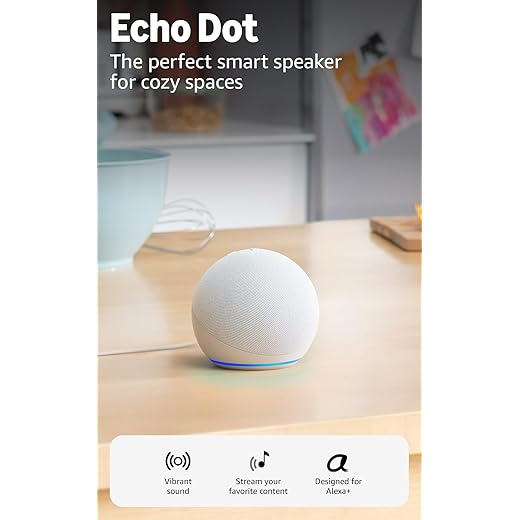
Echo Dot (Alexa) Compact Smart Speaker
You get a compact, affordable speaker that puts the full Alexa ecosystem at your fingertips. It balances sound quality, smart-home control, and strong integration with Amazon services for most rooms in the house.
Pros
- Excellent value for price
- Deep Alexa integration and large skill library
- Small footprint fits any room
- Built-in smart-home controls, temperature and motion-aware routines
Cons
- Sound is good for size but not as full as larger speakers
- Alexa ecosystem may encourage dependency on Amazon services
Overview
The Echo Dot is the compact Alexa speaker designed to give you voice control, smart-home automation, and casual music playback without taking up much space. You'll find it ideal for bedrooms, offices, and kitchens where affordability and functionality matter more than audiophile-level sound.
Key features and what they mean for you
- Hands-free Alexa voice assistant for timers, weather, questions, shopping, and routines
- Works with Amazon Music, Spotify, Apple Music, podcasts, and Bluetooth streaming
- Built-in motion or temperature sensors to trigger automations and routines
- Multiple privacy controls, including a mic-off button and local privacy layers
You can create routines like turning lights on when motion is detected, or have an alarm that snoozes when you tap the device. The Dot also pairs with other Echo devices for multi-room audio or to form a simple home theater with Fire TV.
Practical benefits and limitations
- If you want easy, inexpensive voice control and broad device compatibility, the Echo Dot delivers consistently. You’ll have access to thousands of Alexa skills and a wide range of smart-home integrations.
- If audio quality is your top priority, you should consider a larger Echo or a dedicated speaker; the Dot trades some low-end depth for its small size.
Real users often tell you they love the convenience and reliability for everyday tasks—alarms, timers, and quick voice queries—while noting that heavy music listening reveals the Dot’s size-related limits.
Google Nest Mini Compact Smart Speaker
You get a small, voice-first speaker that ties neatly into Google Assistant and the wider Google ecosystem. It’s especially handy if you rely on Google services, want reliable voice recognition, and need a discreet speaker that blends into your home.
Pros
- Excellent Google Assistant responses and search integration
- Easy setup and global compatibility (international adapters included)
- Compact, wall-mountable design fits many spaces
- Good voice recognition and natural language understanding
Cons
- Sound is limited compared with larger speakers
- Requires constant power (no internal battery)
Overview
The Google Nest Mini (1st Generation) is a compact smart speaker powered by Google Assistant designed to sit almost anywhere in your home. It’s a straightforward way to add voice control, ask questions, and send commands to compatible smart devices while benefiting from Google's search and contextual understanding.
Key features and how you’ll use them
- Google Assistant for contextual voice queries, calendar reminders, and smart-home control
- International power adapter bundle for easy use while traveling or in different outlets
- Small footprint and wall-mount-friendly design so you can place it on a shelf or hang it on a wall
You’ll find it handy for asking quick facts, controlling Chromecast or Nest-compatible devices, and getting proactive reminders from your Google account. The Nest Mini is particularly useful for families that already use Gmail, Google Calendar, and other Google services.
Practical benefits and limitations
- As a budget-friendly speaker, it nails voice recognition and Assistant responses but sacrifices bass and volume compared to larger models. If you primarily need voice control and clear responses, it’s a solid pick.
- If you want broader streaming-service flexibility or stronger audio for music-centric listening, you might outgrow the Mini and consider a larger Nest or third-party speaker with Assistant built in.
Users typically praise the clarity of Google Assistant replies and the compact design, while noting that the Mini’s small speaker means it’s best for background music and voice tasks rather than immersive listening.
Final Thoughts
If you're deep in the Apple ecosystem — iPhone, iPad, Apple TV, and HomeKit accessories — choose the HomePod mini. It scored highest for sound refinement, privacy protections, and the smoothest AirPlay/HomeKit integration. It's ideal for bedrooms, the living room, or any spot where sound quality and privacy are priorities.
If you want broad device compatibility, cheap multi-room coverage, and the largest third-party smart-home ecosystem, go with the Echo Dot. It's the best Alexa-driven pick for controlling a wide variety of brands, building robust routines, and getting hands-free access to Amazon services. Use Echo Dots for kitchens, hallways, and rooms where you want voice control everywhere without breaking the bank.
Smart-Home Guide: Picking, Placing, and Pairing Your Voice Assistant
Choosing the right voice assistant isn't just about a logo — it's about how your devices, services, and habits work together. Below are practical points to help you pick and use the HomePod mini, Echo Dot, or Google Nest Mini effectively.
1) Match assistant to your ecosystem
- If you use Apple devices and HomeKit accessories, the HomePod mini (Expert rating: 9/10) will feel the most native. Siri + AirPlay + HomeKit equals the smoothest experience.
- If you buy lots of third-party smart bulbs, locks, and appliances, Echo Dot (8.5/10) offers the largest library of Alexa skills and integrations.
- If you live in Google services (Gmail, Maps, Calendar), Nest Mini (7.5/10) ties into your info effortlessly and excels at contextual queries.
2) Practical placement and room roles
- Bedrooms: HomePod mini for quiet, private listening and tight Apple integration.
- Kitchen: Echo Dot for timers, shopping lists, and Alexa Skills (recipe helpers, shopping). Its lower price makes it easy to put multiple units around noisy rooms.
- Hallways & guest rooms: Nest Mini for short queries, timers, and discreet presence.
Quick tips:
- Keep speakers away from stovetops and windows.
- Place on a solid surface for better bass.
- For multi-room audio, stick to one brand per zone for best sync and controls.
3) Routines, automations, and real-world examples
- HomePod mini (HomeKit): Use Scenes to set lighting, lock doors, and play a specific playlist when you say “Good night.” HomeKit automations can run locally for speed and reliability.
- Echo Dot (Alexa): Create Routines with multiple triggers (voice, time, smart button) and add Alexa Skills for hands-free control of appliances.
- Nest Mini (Google): Use Routines tied to your commute or calendar events; Google’s context-awareness makes follow-up questions feel natural.
Example routine ideas:
- Morning: lights on (50%), coffee maker on, news flash — triggered by voice or a time.
- Leaving home: turn off lights, lock doors, and arm your security sensor.
4) Network, privacy, and reliability
- Put your smart devices on a stable Wi‑Fi network; many older smart devices prefer 2.4 GHz.
- Use a separate guest SSID for visitors. Consider VLANs or a mesh system if you have many devices.
- Review privacy settings: disable voice history saving or set auto-delete windows if you don’t want recordings retained. Apple emphasizes on-device privacy; Amazon and Google provide clear tools to manage or remove recordings.
5) Mixing assistants and advanced setups
- You can mix brands, but expect friction for cross-ecosystem automations. Use third-party hubs like Home Assistant, SmartThings, or IFTTT to bridge them.
- For the best user experience, designate one assistant as the "automation brain" to run security and complex automations, and use other assistants for convenience queries.
Bottom line: choose the assistant that matches your devices and daily habits. Then focus on placement, stable networking, and simple routines — those three steps turn small speakers into a truly smart home.
FAQ
Can I mix assistants in one house (e.g., HomePod in bedroom, Echo Dot in kitchen)?
Yes. You can absolutely use different assistants in different rooms. Each will work best with its native ecosystem (HomeKit for HomePod, Alexa for Echo Dot, Google services for Nest Mini). For automations, keep critical routines within one ecosystem or use a bridge like Home Assistant or IFTTT to link them.
Which assistant is best at understanding different voices in a noisy home?
Google Assistant and Alexa are both strong at multi-user voice recognition. Google tends to be slightly better at conversational follow-ups and context, while Alexa shines at recognizing voice profiles tied to shopping and personal skills. HomePod mini's Siri is very good within the Apple ecosystem and uses on-device processing for privacy.
Are my voice recordings private? Should I worry?
All three companies offer privacy controls. Apple emphasizes local processing and minimal data collection for HomePod mini; Amazon and Google give options to review and delete recordings, plus toggles to disable voice saving. You should review privacy settings in the companion app and regularly delete or disable recordings if privacy is a concern.
Which speaker sounds best for music in a small room?
HomePod mini delivers the most refined small-speaker sound and spatial tone shaping. Echo Dot gives good performance for its price, and Nest Mini is competent for background music. For critical listening in larger rooms, consider larger speakers or pairing multiple units.
How do I get the most reliable smart-home automations?
Put your hub and most used devices on the same, stable network (2.4 GHz for many smart bulbs/plugs). Use routines or automations inside a single ecosystem where possible (HomeKit scenes, Alexa Routines, Google Home automations). Test triggers and add fallback actions (e.g., notification if a device didn’t respond).
Is the Nest Mini worth it if I'm cheap but use Google services?
Yes. The Nest Mini is a great budget pick if you rely on Google Calendar, Maps, and Assistant. It won’t match HomePod mini’s audio or Echo Dot’s skill ecosystem, but it’s discreet, reliable, and perfect for rooms where you mainly want voice answers and quick controls.
rent smart!
Rent Smart! will help you choose the right smart home devices, skip the expensive mistakes, and enjoy all the convenience without making permanent changes. Build a safer, smarter apartment with renter-friendly devices you can install today and take with you when you move.


