

Extend Your Wi-Fi Signal with a Powerline Adapter


Is It Time For A Powerline Adapter?
Alright, let’s talk about one of those “secret weapons” of home networking: the Powerline Adapter.
If you’ve been fighting with Wi-Fi extenders, mesh systems, or just plain dead zones in your house, this little gadget might just save your sanity.

Why Your Wi-Fi Struggles
Here’s the deal: Wi-Fi and walls don’t get along. Especially if your house is full of:
- Brick 🧱
- Concrete 🪨
- Metal 🚪
Your Wi-Fi signal can bounce, weaken, or straight-up die when it hits those materials. Even a fancy mesh system sometimes can’t push through. That leaves you stuck with “dead spots” that drive you nuts.
Running Ethernet cables through your walls is one option, but let’s be real—it’s messy, expensive, and unless you love drywall dust, not exactly fun.
That’s where Powerline Adapters come in.

What a Powerline Adapter Actually Does
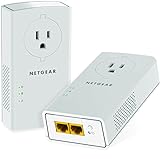
A Powerline Adapter is like a “magic trick” for your house. Instead of trying to force Wi-Fi through walls, it uses something you already have everywhere: your electrical wiring.
Think of it this way: Your house is already wired up to deliver electricity to every outlet. A Powerline Adapter says, “Hey, let’s also use those same wires to deliver internet.” Plug one into your router and a wall outlet, and boom—you’ve got a new internet “pipeline” traveling through your home’s electrical system.
Sounds sketchy? It’s not. Totally safe.
Setting One Up (Without Losing Your Mind)
Here’s the basic game plan:
- Plug the first adapter into a wall outlet near your router. Use an Ethernet cable to connect it to your router.

- Plug the second adapter (the extender) into an outlet in the room where you want better Wi-Fi or Ethernet.
- Hit the pair button on both. They handshake, and now your house wiring is carrying your internet.

That’s it—you’ve just extended your network without drilling holes.
Pairing vs. Cloning (Don’t Panic)
Here’s where people get tripped up: your kit might mention pairing or cloning.
- Pairing: The extender creates a new Wi-Fi network. That means a different name (SSID) and password than your main router. Not terrible, but you’ll have to manually switch networks when you move around the house.

Cloning: This is the sweet spot. Cloning copies your router’s Wi-Fi name and password to the extender. Your devices just see one seamless network. No manual switching, no hassle.

Pro tip: Use cloning if your kit supports it. You’ll thank yourself later.
Confusing? It’s All Explained In This Video 👌
The Catch (a.k.a. The Ugly)
Powerline isn’t perfect. A few things to keep in mind:
- Old wiring = trouble. If your home has ancient or poor-quality wiring, the signal might not travel well.
- Breaker boxes matter. Sometimes the signal can’t jump across certain circuits.
- No power strips. Always plug Powerline adapters directly into the wall. Surge protectors and strips can mess things up.
Bottom line: sometimes Powerline works like a dream, sometimes not at all. The only way to know? Try it. And keep the receipt.
Why It’s Worth a Shot
If your house is a Wi-Fi nightmare, Powerline Adapters can be a lifesaver. They’re:
- Cheaper than rewiring your house
- Easier than running Ethernet
- More reliable than a weak extender in tricky homes
They’re not perfect, but when they work—they really work.
Top Powerline Adapters





Final Word from the WiFi Guy
If dead zones are driving you crazy and you’re not ready to drop cash on a full-blown mesh system, give Powerline a try. It’s not glamorous, but it might be the shortcut to rock-solid internet in those rooms you thought were hopeless.
And hey—if you do try it and it doesn’t work? At least now you’ll know without spending thousands on rewiring.
Home Network Engineer Course
✅ You’ll Be Able To:
- Fix Wi-Fi and device problems fast – Know what’s wrong and how to handle it
- Speed up your connection – Boost coverage, kill lag, and reduce dropouts
- Lock it down – Protect your network from freeloaders and shady devices
- Upgrade with confidence – Know what gear to get (and what to skip)
- Stop second-guessing yourself – Never be scared of a blinking router again
Last update on 2026-05-06 at 00:37 Affiliate links and Images from Amazon Product Advertising API


