
These Wi-Fi 7 Mesh Systems Don’t Play
Dead zones don’t care how fast your internet plan is.
They just show up and ruin things anyway.
These three Wi-Fi 7 mesh systems are built to shut that down. They blanket your home with solid coverage so your Wi-Fi doesn’t fall apart the moment you leave the room. That means less buffering, fewer disconnects, and way less frustration.
Our Top Picks


NETGEAR Orbi 770 Tri‑Band Mesh System
This is a power user's mesh: top-tier Wi‑Fi 7 throughput and very wide coverage that handles heavy streaming, gaming, and many concurrent devices. You pay more, but if you need the extra speed and more robust controls, it delivers.
Pros
- Class‑leading throughput and very wide coverage
- Strong wired options (2.5GbE) and tri‑band design for backhaul
- Robust security features and device handling for large households
Cons
- Higher price that can be overkill for typical users
- Initial firmware updates and setup can be fiddly for some
Raw power and wide coverage
The Orbi 770 is designed for households that treat bandwidth like oxygen: many people streaming 4K, cloud gaming, and smart‑home gear all at once. With advertised combined speeds up to double‑digit gigabit levels and support for large homes (up to ~8,000 sq ft), it’s a strong pick if you want future‑proofed performance.
What makes it stand out
Netgear packs serious radio and wired muscle into this system. You get tri‑band Wi‑Fi 7 radios that keep congested devices separated and a 2.5GbE port to give your primary wired device or NAS a fast path to the internet. Users report excellent real‑world coverage when the units are positioned across floors.
- Tri‑band Wi‑Fi 7 optimized for high throughput and low latency
- Multiple 2.5GbE ports for fast wired connections and wired backhaul
- Large coverage area and support for dozens of simultaneous devices
Practical notes, limitations, and tips
Expect to pay a premium—many reviewers rightly call it an investment. You may also run into a little extra effort during first setup because firmware and satellite registration steps sometimes require a wired jumper or two. Once it’s up to date and in place, however, it typically runs rock‑steady.
- If you have a complex home or older router in front of it, plan for a bit of setup time to avoid double‑NAT issues.
- Put the router centrally and use wired backhaul if you have the option; that’s the fastest route to consistent multi‑floor performance.
One satisfied owner said it "immediately solved every dead zone and connectivity issue"—a nice summary of what this system aims to do: make your Wi‑Fi disappear into the background so you can get on with life.
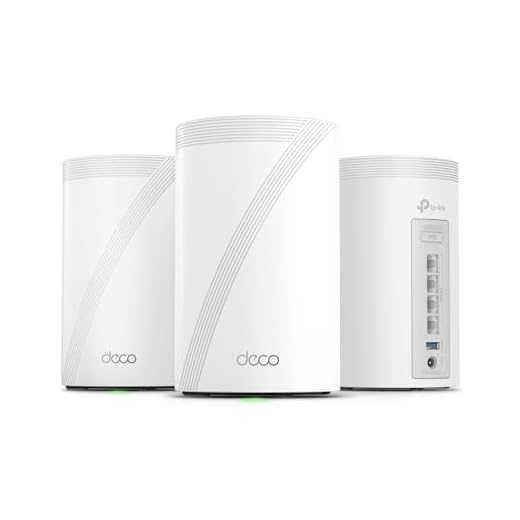
TP‑Link Deco 7 Pro BE10000 Mesh
You get Wi‑Fi 7 speeds, wide coverage, and lots of wired ports without paying extreme premium prices. It’s an excellent everyday mesh that makes dead zones a forgettable memory while still offering advanced features for power users.
Pros
- Excellent Wi‑Fi 7 performance and tri‑band throughput
- Lots of multi‑gig wired ports (four 2.5Gbps) for wired backhaul or high‑speed devices
- Covers large homes and handles many simultaneous devices
- Easy setup and management via Deco app with HomeShield security
Cons
- Bulky power adapters with short cords (reported by users)
- USB sharing and some advanced features can be a bit quirky
Why you might pick the Deco 7 Pro
If you want a practical, powerful Wi‑Fi 7 mesh that won’t feel like an overengineered lab experiment, this Deco is a solid pick. It delivers the new Wi‑Fi 7 tricks (Multi‑Link Operation, big channels, and higher QAM) in a user‑friendly package so streaming, gaming, and dozens of smart devices all get treated nicely.
What it actually does for your home
It’s a tri‑band system rated for very high combined throughput and large coverage. In plain terms: you’ll notice fewer buffering wheels, more consistent video calls, and better throughput on wired devices thanks to those 2.5Gbps ports.
- Tri‑band Wi‑Fi 7 with 6GHz, 5GHz, and 2.4GHz bands for split traffic and less congestion
- Four 2.5Gbps ports (per unit) for wired backhaul, NAS, or fast wired devices
- HomeShield security and mobile app controls for parental controls and device monitoring
Real‑world tradeoffs and tips
You’ll get great performance, but it’s not perfect. Some users reported annoyances like oversized power bricks and short cords—annoying if you want clean cable runs. The USB sharing feature works but can be oddly specific about which unit is the host.
- If you can, use Ethernet wired backhaul between nodes for the most consistent speeds across floors.
- If you have older devices that balk at WPA3, consider a dedicated 2.4GHz guest or legacy SSID to avoid connection headaches.
"Setup was simple and straightforward via the Deco app," one user noted—so if you dread router menus, you’ll probably be relieved. For most homes this is the sweet spot: plenty of future‑proofing without breaking the bank.
Amazon eero Pro 7 Tri‑Band Mesh
It makes mesh networking almost boring in the best possible way: set it up, forget about it, and enjoy solid coverage. If you want something that 'just works' and receives frequent updates, this is an excellent choice.
Pros
- Very simple, guided setup and reliable auto updates
- Good coverage and stable tri‑band Wi‑Fi 7 performance
- Tight integration with eero ecosystem and Alexa devices
Cons
- Higher price compared with some competitors
- Fewer advanced manual settings for networking power users
A mesh that makes networking easy
If you’re the type who’d rather spend time streaming than fighting with advanced router menus, the eero Pro 7 is tailored to you. It focuses on painless setup, reliable firmware updates pushed automatically, and consistent performance across a typical multi‑room house.
Key strengths and what you’ll notice
eero keeps the interface clean and the experience low‑stress. Under the hood you still get tri‑band Wi‑Fi 7 that can support very fast internet plans (the product lists compatibility up to multi‑gig speeds), and it’s designed to eliminate dead zones across floors and rooms.
- Straightforward app‑driven setup with step‑by‑step guidance
- Tri‑band Wi‑Fi 7 for less congestion and better multi‑device handling
- Good fit for smart homes and households that use Alexa
Practical considerations and tips
eero’s hands‑off model is great if you don’t want to babysit updates, but that convenience comes with tradeoffs: you’ll see fewer knobs for deep customization (VLANs, advanced QoS rules, or very granular firewall rules). Also plan for potential extra costs if you want eero+ style security or parental filters.
- Use Ethernet backhaul if you want the best inter‑node throughput in large homes.
- If you’re a networking hobbyist who wants every setting exposed, this may feel limiting; otherwise you’ll appreciate the simplicity.
Final Thoughts
Pick the NETGEAR Orbi 770 if you want raw speed and the broadest coverage. It’s the best choice for heavy streamers, large homes, and gamers who need top-tier Wi‑Fi 7 throughput and advanced controls. Expect a premium price, but also premium performance.
Choose the TP‑Link Deco 7 Pro BE10000 if you want almost everything the Orbi offers but at a friendlier price. It balances high Wi‑Fi 7 speeds, good coverage, and more wired ports—perfect for most households, home offices, and small apartments that want great performance without splurging.
If you value absolute simplicity and frequent automatic updates, the Amazon eero Pro 7 is a fantastic hands‑off pick—very easy setup and reliable day-to-day performance, though a touch less aimed at power users.
Wi-Fi 7 Mesh Bullies: Side-by-Side
| Mesh System | Best For | Why It Stands Out | Setup & Management | Watch-Out |
|---|---|---|---|---|
| TP-Link Deco BE63 | Most homes that want power without overspending | Hits the sweet spot between performance, coverage, and price | App-based setup, easy to manage, flexible options | Advanced features are there, but not fully hands-off |
| Amazon eero Pro 7 | People who want the least hassle possible | Almost set-and-forget; everything “just works” | Easiest setup of the three, very automated | Some advanced controls are hidden or locked down |
| NETGEAR Orbi 770 | Larger homes that need consistent coverage everywhere | Strong, stable coverage across big spaces | More traditional setup, more knobs to turn | Bigger footprint and higher cost |
WiFi Guy Decision Shortcut
- Pick the Deco BE63 if you want the best balance of power and price
- Pick the eero Pro 7 if you want Wi-Fi you never think about
- Pick the Orbi 770 if your house is big and dead zones are stubborn
No wrong choices — just different priorities.
How to Choose, Set Up, and Get the Most from a Wi‑Fi 7 Mesh
Quick buying checklist
- Coverage area: Map your home roughly (square feet, floors). Bigger homes need more nodes.
- Wired ports: If you have smart TVs or desktop PCs, pick a unit with enough Ethernet ports (Deco 7 Pro is strong here).
- Features vs price: Orbi 770 gives the fastest speeds and advanced controls. Deco 7 Pro balances features and cost. Eero Pro 7 trades some power for simplicity.
- Backhaul option: Prefer systems with dedicated wireless backhaul bands or the ability to use wired backhaul for best performance.
Placement tips that actually work
- Put the main router in a central, elevated spot. Avoid hiding it in a cabinet.
- Place satellites halfway between the router and the area with a weak signal. If a room has spotty Wi‑Fi, don’t tuck the node on the other side of a thick wall.
- Keep nodes away from large metal objects, microwaves, and thick concrete walls. Small obstacles matter more than you think.
Practical setup and maintenance
- Use the vendor app to run a mesh scan after setup—most apps will suggest better node spots.
- Enable automatic firmware updates for security and performance improvements.
- If you have a modem/router combo from your ISP, switch it to bridge mode to avoid double NAT problems unless you know you need both devices’ features.
Common mistakes to avoid
- Buying more nodes than you need. Start small and add if coverage gaps remain.
- Mixing different mesh brands. They rarely interoperate well; stick to one system for best results.
- Ignoring wired options. Ethernet backhaul removes the biggest variable in home Wi‑Fi performance.
Budget vs premium: where to spend
- Spend more on the router/node that will sit in the busiest area of your home (living room, home office). That one unit handles most traffic.
- If you need simple reliability, the eero Pro 7 gives low‑fuss performance without advanced setup.
- If you want top performance and advanced controls, invest in the Orbi 770. For most people who want performance without the top price, the Deco 7 Pro gives the best compromise.
Final use-case cheat sheet
- Large home with many devices or competitive gaming: NETGEAR Orbi 770.
- Balanced home use, good wired connectivity, value: TP‑Link Deco 7 Pro BE10000.
- Minimal fuss, frequent updates, small to medium homes: Amazon eero Pro 7.
Use these tips and you’ll fix dead zones faster than you can say buffering. Happy surfing!
FAQs
Do I really need Wi‑Fi 7 right now?
Not always. Wi‑Fi 7 delivers higher speeds, lower latency, and better handling of many devices at once. If you stream 4K/8K, game competitively, run lots of smart devices, or want future-proofing, Wi‑Fi 7 is worth it. If your usage is basic browsing and a couple of streams, Wi‑Fi 6/6E will still do the job.
Will these mesh systems work with my ISP or modem?
Yes. Mesh systems act as your home network; they plug into most ISP modems or gateway boxes via Ethernet. If your ISP provides a combined modem/router, you may need to put that device into bridge mode or disable its Wi‑Fi to avoid two competing networks.
How many mesh units do I need to eliminate dead zones?
Start with the 2‑pack if you have a medium house (2,000–3,500 sq ft). Add a satellite for larger homes or tricky layouts. Factors: building materials, floor count, and where you need coverage. You can always add another node later.
Should I use wired backhaul?
Yes, when possible. Running Ethernet between nodes gives you the most stable speeds and frees the wireless bands for devices. If wiring isn’t practical, these Wi‑Fi 7 systems are better at wireless backhaul than older gear, but wired is still the gold standard.
Is setup difficult for non‑tech people?
Not with these models. The eero Pro 7 is the easiest—guided app setup and minimal knobs. TP‑Link and Netgear give more advanced settings but still offer friendly apps and step‑by‑step setup. You’ll be done in 15–30 minutes most of the time.



Small apartment — should I even bother with Wi‑Fi 7 mesh? The eero Pro 7 seems overkill but I like the simplicity. 🤔
For a small apartment a single strong Wi‑Fi 7 router (or a 3‑pack for placement flexibility) can be overkill but gives longevity. If you want low fuss, eero is fine — but you could save with a single high-end router instead.
I’m in a 700 sq ft place and one eero unit gives perfect coverage. I won’t upgrade again for years.
Heads up: I had coverage overlap issues when placing Orbi satellites too close to the main. If you’re moving from single-router thinking, give each unit at least a few meters distance for proper mesh handoff.
Also: avoid putting satellites next to big metal objects or fish tanks. They are signal-eating monsters 😂
Great practical tip — too-close placement can cause interference and poor client handoffs. Spacing and orientation matter more than most expect.
I learned this the hard way. Moved mine to a hallway and it fixed a bunch of weird dropouts.
Just a quick note: if you’re on a multi-gig ISP plan, check the number of 2.5G ports on the units. Deco 7 Pro has multiple 2.5G ports which helped me avoid buying additional switches.
Also worth checking whether the units allow LAN link aggregation if you need even more bandwidth.
Exactly — port availability can save you money and complexity, especially if you want NAS or wired backhaul without extra hardware.
Orbi has a 2.5G Internet port on the router too, but Deco’s multiple 2.5G ports are handy for small offices.
I like the TP-Link Deco’s HomeShield features, but do you need the subscription? How limited is the free tier compared to paid?
I stuck with the free plan for a year and only upgraded because of the advanced filtering for kids. Depends on your needs.
The free tier covers basic security and parental controls. Paid HomeShield adds advanced threat protection, detailed reports, and extra protection layers. You can run it fine on free tier, but paid is useful for families who want deeper controls.
I went with the NETGEAR Orbi 770 for my large house and it’s been night-and-day. Coverage is solid across three floors and Plex streams don’t hiccup anymore. Painful price but honestly worth it for heavy users.
One tip: put the satellite in an open area (not hidden in a cabinet) — made a big difference for me.
Glad it worked out, Laura — thanks for the placement tip. Many users underestimate how much furniture and cabinets kill signal strength.
Mark: around 60 devices (smart bulbs, cams, phones, laptops). The Orbi handles them with no drama so far.
Totally — I had mine behind a TV stand and moved it to a shelf. Instant improvement. How many devices do you have connected?
Anyone comparing throughput numbers in real life? Specs say 10 Gbps etc., but real world usually lower. Which of these came closest for you?
Real-world throughput depends on your internet plan, local interference, and device capabilities. Orbi hits higher throughput ceilings in lab tests, Deco is very close for most consumer setups, and eero prioritizes stability over absolute top speed.
With a 1Gbps plan I saw ~900Mbps on wired tests with Deco and Orbi; wireless peaks varied by client device, of course.
Long post because this keeps coming up and I want to save people time:
I swapped my ISP gateway for a Deco 7 Pro (3-pack) and bridged it with my smart home hub.
– Coverage: whole house, no dead zones
– Speed: matched my 1Gbps plan indoors
– Setup: app-based, took ~25 minutes
– Bonus: extra 2.5Gb ports for NAS
If you have a smart home, this handles dozens of devices gracefully. 👍
Did you use wired backhaul between nodes? Curious how your NAS is connected.
Fantastic write-up, Olivia — the note about NAS and 2.5Gb ports is especially useful for folks with heavy local network needs.
Ethan: NAS is on a 2.5Gb port on the main unit. I wired the main to the switch; satellites are wireless but dispersion is excellent.