
Two Affordable Mesh Wi-Fi 6 Systems Battle It Out!
Ready to stop yelling “Who stole the Wi‑Fi?”—we’ll show you which Wi‑Fi 6 mesh actually speeds up your home, which wastes your money, and exactly how to pick the right one.
Surprising fact: your router is tired—mesh can save your streaming life. Choosing between the TP‑Link Deco X55 and Amazon eero 6? This guide cuts through specs to show real‑world speed, coverage, setup, and value so you can decide without stress.
Wide Coverage

8.8
If you need to blank out dead zones across a big house, this leans toward the practical choice — lots of coverage, modern Wi‑Fi 6 speeds, and actual Ethernet backhaul support. You’ll get strong performance for many devices without paying a premium, though power users looking for multi‑gig ports or included premium security might want to consider add-ons.
Easy Setup

7.8
If you want a set‑and‑forget mesh that grandma could install, this nails the simplicity and steady everyday performance. You’ll trade a bit of raw coverage and port flexibility for a very friendly app experience and reliable home networking.
Deco X55
- Coverage – 9
- Throughput – 8.8
- Ease of Setup – 8.6
- Value – 8.8
eero 6
- Coverage – 7.5
- Throughput – 7.8
- Ease of Setup – 9
- Value – 6.9
Deco X55
Pros
- Very wide coverage (advertised up to ~6500 sq. ft.)
- Wi‑Fi 6 AX3000 speeds with 3 Gigabit ports per unit
- Supports Ethernet backhaul for stable links between nodes
- Strong price-to-performance — good value for large homes
- Easy mobile app setup and automatic band steering
eero 6
Pros
- Extremely easy, fast app-driven setup — very beginner-friendly
- Compact design that blends into living spaces
- Reliable day-to-day performance and automatic updates
- Good parental controls and device management via the app
Deco X55
Cons
- Advanced security or parental features require paid HomeShield tier
- No multi‑gig WAN port for future-proofing power users
eero 6
Cons
- Less overall coverage compared to larger-capacity mesh packs
- Fewer Ethernet ports per unit and pricier than similar alternatives
Mesh WiFi Router Showdown: What Your Extra Spend Really Gets You
Speed, range, and real‑world performance
What “AX3000” and “500 Mbps” actually mean
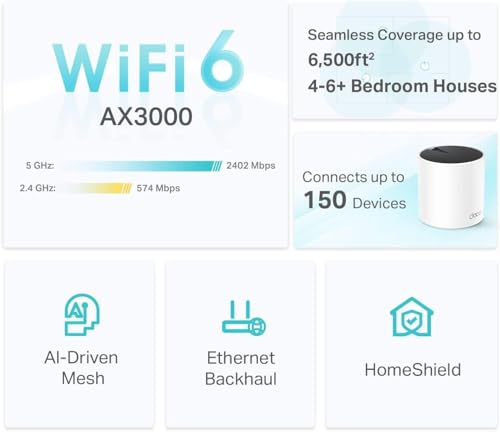
AX3000 is marketing shorthand — it sums the theoretical top speeds of the Deco’s radios (roughly 2400 Mbps on 5 GHz + ~600 Mbps on 2.4 GHz). In plain English: the Deco X55 has more radio muscle than entry-level kits, but those numbers are never the speeds you’ll see on a single laptop. The eero’s “supports up to 500 Mbps” is a practical ISP guideline: it’s saying “we can handle most home internet plans without choking.”
Real-world speed and device load
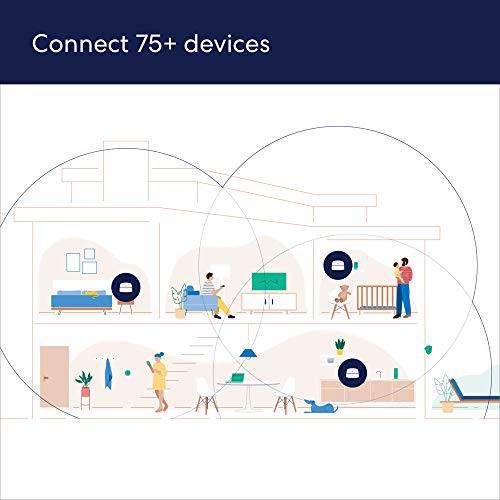
In everyday use the Deco X55 typically delivers higher aggregated throughput and better wired options (three gigabit ports per unit), so it’s faster when many devices stream or you plug in gaming PCs and TVs. The eero 6 is optimized for simplicity and steady performance — it comfortably supports ~75 devices and is excellent if your internet plan is <=500 Mbps.

Coverage, dead zones, and multi-floor homes
Advertised square footage is optimistic — walls, floors, and appliances shrink coverage. Deco’s larger claimed 6,500 sq. ft. and stronger radios usually reduce dead zones in bigger houses. Crucially, Deco supports Ethernet backhaul: run an Ethernet cable between nodes and you get near‑wired speeds across floors. The eero’s 4,500 sq. ft. claim is realistic for apartments and medium homes and is simpler to set up.
- Quick takeaway: Deco = better for larger homes, heavy wired use, multi‑floor setups.
- Quick takeaway: eero = easier setup, great for typical homes with ≤500 Mbps plans.
Setup, daily use, and features that affect your life
What setup looks like
Both systems are app‑driven and idiot‑proof — you’ll plug the main unit into your modem, open the app, and follow step‑by‑step prompts. The eero is the simplest: the app practically holds your hand and finishes faster. The Deco setup is just as guided but exposes more advanced options if you want them.


Apps, controls, and subscriptions
You get basic device management, guest Wi‑Fi, and parental controls on both apps. Important differences:
- Deco gives more fine‑grained settings in the app but locks advanced security and parental features behind the paid HomeShield tier.
- eero is simpler and includes a 30‑day trial of its subscription; ongoing protective features also require a paid plan.
Both integrate with mainstream smart‑home assistants so you won’t wrestle with routine automations.
Ports, Ethernet backhaul, and physical life
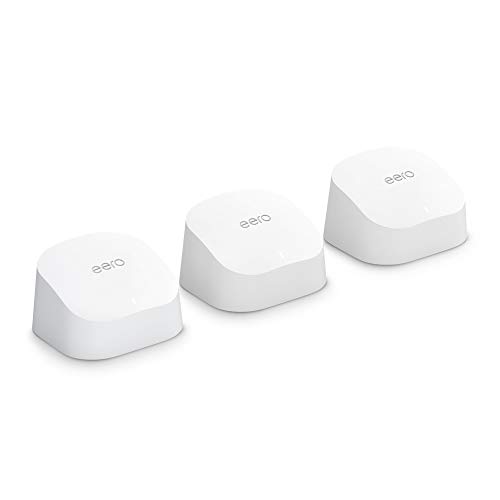
Deco units each have multiple gigabit ports and explicit Ethernet backhaul support — great if you want wired nodes for gaming consoles or NAS boxes. eero’s 3‑pack uses 1 router + 2 extenders and has fewer Ethernet ports, so it’s cleaner-looking but less flexible for wired setups.


Practical tips that save time
- Use Ethernet backhaul when possible for stable, fast multi‑floor coverage.
- Keep one unit in the open (not in a cabinet); walls kill Wi‑Fi.
- Start with default settings, enable guest Wi‑Fi, then tweak only if you actually need to.
Feature Comparison Chart
| Features | Deco X55 | eero 6 |
|---|---|---|
| Model | Deco X55 | eero 6 |
| Wi‑Fi Standard | Wi‑Fi 6 (AX) | Wi‑Fi 6 (AX) |
| Max Theoretical Speeds | AX3000 (2402 Mbps + 574 Mbps) | AX1800 (combined ~1.2 Gbps typical class) |
| Coverage (sq.ft.) | Up to ~6500 sq. ft. (3-pack, manufacturer estimate) | Up to ~4500 sq. ft. (3-pack, manufacturer estimate) |
| Units in Pack | 3 units (3-pack) | 3 units (1 router + 2 extenders) |
| Ports per Unit | 3 x Gigabit Ethernet ports | 2 x Gigabit Ethernet ports |
| Ethernet Backhaul Support | Yes | Yes |
| Max Devices Recommended | Ideal for many devices (30+ typical) | Connects 75+ devices (manufacturer guidance) |
| ISP Speed Support | Suitable for gigabit-class plans (depends on ISP) | Optimized for plans up to ~500 Mbps (per product info) |
| Security Features | TP‑Link HomeShield (basic free; paid upgrades available) | eero Secure trial included; subscription unlocks extra protections |
| App / Management | TP‑Link Deco app | eero app |
| Subscription for Advanced Features | Optional paid HomeShield Pro | Optional eero Secure subscription |
| Price | $$ | $$$ |
| Ideal For | Large homes, many devices, users wanting strong coverage/value | Apartments and mid‑size homes; users who value simplicity |
Price, value, and who should buy which system
Money talk, without the anxiety. Here’s what your dollars actually buy and when it’s worth spending more (or not).
When paying more makes sense
- Bigger home: you need coverage that actually reaches upstairs and the backyard — more nodes or stronger radios matter.
- Faster ISP (200+ Mbps): a system that won’t bottleneck your plan, especially under load.
- Lots of wired devices: if you want wired backhaul or multiple gigabit ports at each node.
Which system fits common scenarios
- Small apartment (single floor, <1,200 sq ft): eero 6 — easiest setup, compact, reliable for streaming and many devices; you won’t miss the extra ports.
- Average family home (2–3 bedrooms, some dead zones): Deco X55 — better coverage per pack, more gigabit ports, and Ethernet backhaul for stable gaming/streaming. Better value here.
- Power user with a gigabit plan: neither is perfect (no multi‑gig WAN), but Deco X55 is the smarter stopgap if you need mesh now — use wired backhaul. Long term, upgrade to a higher‑end AX/tri‑band system.
Quick next steps
- Check your ISP speed (speedtest.net).
- Walk your home and mark dead zones.
- Consider wired backhaul where possible.
- Buy from a seller with a good return window and try it in your space.
Final verdict — which should you pick?
Deco X55 is the practical winner — choose it if you have a larger home, an ISP above ~500 Mbps, or want wired backhaul and extra Ethernet ports.
Pick eero 6 if you want the simplest setup, Amazon integration, and coverage for a typical 1–3BR home under 500 Mbps. Check your speed, placement, return window.





I went with the Deco X55 for my old Victorian house — lots of brick and weird corners. Set up was straightforward and the ethernet backhaul option was a lifesaver. Speeds are solid in every room now. Only gripe: the Deco app nags a bit with updates. 🤷♀️
Thanks for sharing, Emma — great real-world example. The Deco X55 does tend to shine in brick/older homes because of the stronger radios and extra ports for wired backhaul. Glad it worked out!
App nags haha — same here. But I’d trade that for coverage any day. Did you use the 3-pack or add extra nodes?
Nice! Curious — are you seeing full gigabit on wired devices, or is it capped? I heard the X55 AX3000 can be limited by ISP sometimes.
Quick tip: If you buy Deco X55, make sure you toggle the mesh settings for band steering and prefer Ethernet backhaul if possible. It helped my throughput a lot.
Good practical tip — enabling band steering often reduces client stickiness and improves speeds. Thanks for sharing!
I’m leaning eero 6 because my ISP is only 300 Mbps and I don’t plan to add wired devices. Anyone regret choosing eero for a small apartment?
For a small apartment and sub-500 Mbps plan, eero 6 is a solid, low-hassle choice. You’ll get stable coverage and easy management. Only downside would be fewer advanced settings if you want fine-grained control.
No regrets here. I have a similar setup and eero has been flawless. If you ever want more control, consider a standalone router + eero extenders, but that’s more complex.
Heads up for gamers: if you want the lowest ping, Deco with ethernet backhaul seems to be the better choice. Also, QoS on Deco is more useful than eero’s basic options.
Good to know — I throw a cable between nodes for the consoles now and it’s night and day.
Also remember to enable Universal Plug and Play settings appropriately for hosting games — sometimes firewall defaults block ports.
Agreed — wired backhaul reduces latency and packet loss. Deco’s extra ports are handy for that use case.
Eero has a decent gaming mode in their app but it’s not the same as full QoS controls.
I wrote a little diary while switching:
Day 1: Eero — setup 10 minutes, all devices online, instant relief.
Day 3: Deco — took longer, but rooms that had patchy signal now have full bars.
Day 7: Went back to eero because my smart plugs kept disconnecting less frequently.
Conclusion: There’s no one-size-fits-all. For me, stability with day-to-day smart devices outweighed raw range. Maybe Deco is for power users and eero for people who want peace of mind.
Smart plugs are the worst. I ended up segmenting my IoT on its own VLAN with Deco and it’s been better, but not everyone wants that complexity.
Yep. I keep a small eero for the smart devices and a Deco for the rest lol. Hybrid setups can work.
Did you try changing the Zigbee/Z-wave channels? Sometimes Wi‑Fi interference messes with smart devices.
Love the diary format — that tells the real story. Smart home flakiness is a common tie-breaker in favor of eero for many users.
Zoe — thanks, that diary is helpful. Shows how subjective these things are.
Anyone have experience with ISP-provided modems? I want to keep mine and add mesh. Heard both work fine but sometimes double-NAT causes issues.
Correct — bridge mode is ideal. If that’s not available, AP mode on the mesh system is the simpler workaround. Deco supports both; eero also has an access point mode but with fewer features.
Yep — put the ISP modem into bridge mode if possible. Otherwise you can set the mesh to AP mode to avoid double NAT.
Okay, long post because I tested both for a week each in the same house:
– Deco X55 (3-pack): Better throughput at longer range, lots of ethernet ports, felt more “pro”. Harder to convince my partner to use the app but overall faster.
– Eero 6 (3-pack): Super easy to set up, devices reconnect faster after router reboot, and the mesh felt slightly more seamless switching rooms.
Verdict for us: Deco for performance and wired stuff, eero for simplicity and stability in everyday use. Your mileage may vary! 🙂
Thanks — the bit about devices reconnecting faster after reboots is gold. That’s a real-world pain point.
Great A/B test, Priya — that aligns with what we saw in the article. Deco X55 edges out on raw performance and features; eero scores on ease-of-use and simple UX.
Nice breakdown. Did you test with the same SSID names and band settings for both? Seamless roaming on eero is what tempts me…
Curious: Any firmware weirdness while testing? I had a Deco update that bricked one node for a day last year 😅
I tried to be funny and placed an eero in a plant pot to “blend in”. It overheated and died. 😂
Serious note: both systems benefit from airflow. Also, if you have wired Ethernet wiring in the house, Deco X55 can leverage that more effectively with its 3 gigabit ports per unit.
Scheduled reboots can mask root problems but yeah, it’s a practical workaround.
Haha — the plant pot story is gold. And yes, Deco’s ports are an advantage if you have existing Ethernet runs to use as backhaul.
One more pro tip: run a scheduled reboot at 3am if you’re worried about long-term stability. Works for me.
Plant pot experiment — legendary. 😂 Also learned about airflow the hard way, props for testing!
Overheating in enclosed spaces is a thing. Keep them ventilated and out of enclosures.
I compared price/performance and the Deco X55 value is wild. 3 gigabit ports per unit? That’s perfect for my streaming PC + NAS + console setup.
Also, the Deco is bulkier but I don’t mind. The eero looks nicer on the shelf tho 😅
Short answer: Deco tends to be slightly better for latency-sensitive stuff, but your ISP and home wiring also play big roles.
Latency can be influenced by routing and backhaul. If gaming is a priority, Deco with ethernet backhaul is usually the safer bet.
Ports are a huge deal. I’m plugging a PS5, a NAS and an IPTV box into one node — Deco saved me from buying extra switches.
Totally. I added a small unmanaged switch to an eero node and it’s fine, but yeah, extra hassle.
Anyone tested gaming latency differences between them? Deco’s hardware should help, right?
Exactly — Deco gives you more physical ports, which matters if you have multiple wired devices at each node. Aesthetics vs. functionality tradeoff!
Small tip: if you have lots of IoT devices and weak security habits, think about which system you can more comfortably manage. Deco gives you more controls; eero gives you simpler parental and guest network options. Choose based on who will actually touch the app.
Good point — match the system to who will maintain it. Simplicity wins for households where someone doesn’t want to tinker.
Multi-line rant incoming:
I bought eero 6 because my friend said it “just works.” It did, for a while. Then after 6 months, one extender started rebooting randomly, taking smart bulbs with it. Support helped, but it was a chore.
Switched to Deco X55 and haven’t had that specific problem. But I do miss the clean eero app experience. If you’re not tech-averse, Deco might be worth the extra setup time.
Thanks for the detailed experience, Olivia — real usage over months is the best indicator. Eero’s UX is polished but hardware hiccups can tip the scale toward Deco for some users.
Random reboots sound like power/firmware issues. Glad the Deco fixed it — sometimes a full swap is the cleanest solution.
I was surprised how much coverage the Deco X55 claimed (6500 sq ft). My house isn’t that big but it definitely reached spots my old router couldn’t. FYI: Placement still matters a TON.
Exactly — manufacturers’ coverage numbers assume ideal conditions. Real-world factors like walls, materials, and interference change things a lot.
Placement & avoiding obstacles. Learned that the hard way — kitchen appliances are signal eating beasts.
Did you place them high or low? I have mine on shelves and that helped a lot.
Eero 6 here. Setup was the easiest thing in the world — if you want no fuss and decent coverage for up to 500 Mbps, it’s hard to beat. But yeah, the advanced settings are barebones compared to TP-Link.
Curious if anyone mixed brands? Like using an eero as the main router and Deco nodes or vice versa. I assume not recommended, but wondered if anyone tried.