
Mesh Wi-Fi 7 Battle Of The Beasts!
Want jaw‑dropping Wi‑Fi 7 speeds without the geek speak—find out whether the Orbi’s premium punch or the Deco’s value‑packed smarts will actually make your streaming, gaming, and Zooms smoother (and less annoying)?
Ready to turbocharge your Wi‑Fi? You’re deciding between the NETGEAR Orbi 770 and TP‑Link Deco BE85; this quick guide breaks down speed, coverage, setup, and real‑world value in plain English so you can pick the right Wi‑Fi 7 mesh today.
Wide Coverage

8.3
You’ll get dependable, wide-reaching Wi‑Fi 7 coverage that simplifies life across big houses and multi-floor layouts. It’s impressively fast for streaming and gaming, but if you like to tinker under the hood you might find the admin options a little tight and the automatic backhaul choices imperfect.
Raw Speed

9
You’ll appreciate the speed-first approach here — it’s built to push huge bandwidth and to give wired-attached devices the love they deserve. Setup and the Deco app are straightforward for most people, but expect some initial fiddling with account/2FA quirks and a bit more physical footprint on your shelves.
Orbi 770 Mesh
- Speed – 8.5
- Coverage – 9
- Features – 8
- Ease of Use – 7.5
Deco BE85 Elite
- Speed – 9.5
- Coverage – 8.8
- Features – 9.3
- Ease of Use – 8.5
Orbi 770 Mesh
Pros
- Strong whole-home coverage (manufacturer claims up to 8,000 sq ft)
- Solid Wi‑Fi 7 performance for high-bandwidth tasks
- Backward compatible with older Wi‑Fi devices
- Integrated security features and mesh stability in many setups
- Good fit if you already use NETGEAR/Orbi ecosystem
Deco BE85 Elite
Pros
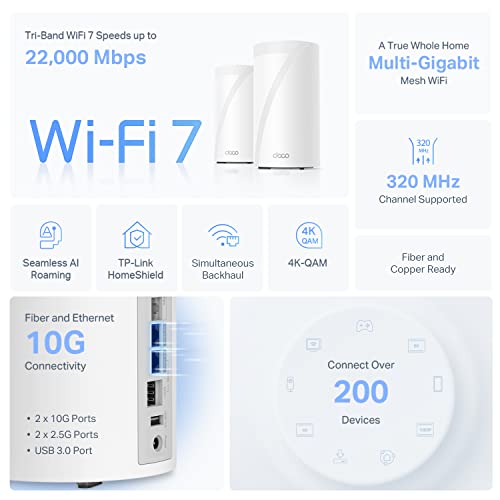
- Top-tier raw speeds thanks to BE22000 design and advanced Wi‑Fi 7 tech
- Generous wired connectivity (2 x 10G + 2 x 2.5G) and USB port
- Supports wired and wireless backhaul simultaneously for flexible setups
- Robust feature set (AI‑roaming, HomeShield security, VPN) and intuitive app
Orbi 770 Mesh
Cons
- Limited low-level admin controls — not ideal if you like deep tuning
- Reported issues with automatic backhaul band switching in some homes
- Premium price compared with some competitors
Deco BE85 Elite
Cons
- Larger physical units — takes more shelf space
- Occasional app/2FA friction reported during setup for some users
- Higher complexity and cost for buyers who just need basic Wi‑Fi
Premium WiFi 7 Routers Showdown: NETGEAR Orbi 970 vs Eero Max 7 vs TP-Link Deco BE85
Performance & Hardware: Speed, Coverage, and Ports
Speed & streams
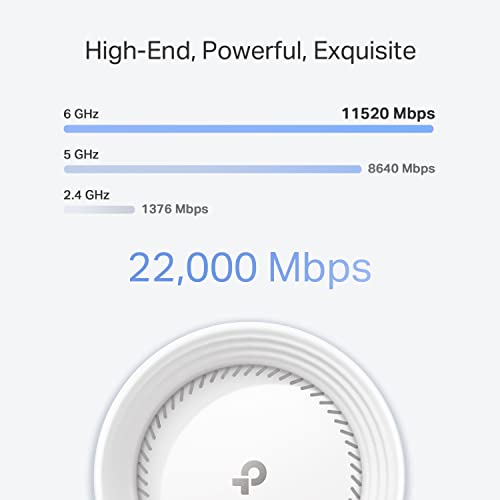
NETGEAR touts up to 11 Gbps; TP‑Link markets a BE22000-class 22 Gbps (12‑stream) design. In plain English: those are theoretical peak totals across all bands, not the number you’ll see on a single laptop. Real‑world: expect hundreds of Mbps to a few Gbps on modern Wi‑Fi 7 clients in ideal rooms. The Deco’s higher headline and extra streams mean it can handle more simultaneous heavy sessions (4K streams, cloud backups, cloud gaming) without choking.
Coverage & device capacity
Orbi claims up to 8,000 sq ft and ~100 devices — that’s realistic in open layouts with good placement. Both systems are built for big homes and multi‑floor coverage; more satellites = fewer dead zones. If your house has lots of walls or floors, plan for closer placement of units.
Ports & wired performance
Orbi: a 2.5G WAN/LAN port — fine for most home fiber under 2 Gbps.
Deco BE85: 2×10G + 2×2.5G — that’s for serious wired setups: 10 Gbps ISP links, high‑speed NAS, or aggregation for gaming rigs and switches.
Antennas, backhaul, and why streams matter
More streams and antennas (Deco’s 8 high‑gain antennas) mean the system can keep many devices fed without slowing one another down. Deco supports simultaneous wired/wireless backhaul for stable links; Orbi’s tri‑band mesh gives strong wireless backhaul too.
Which option fits you best?
- Fast fiber plans and NAS-heavy homes: Deco BE85.
- Simple multi‑floor coverage and good performance without 10G needs: Orbi 770.

Feature Comparison
| Features | Orbi 770 Mesh | Deco BE85 Elite |
|---|---|---|
| Wi‑Fi Standard | 802.11be (Wi‑Fi 7) | 802.11be (Wi‑Fi 7) |
| Max Theoretical Speed | Up to 11 Gbps (aggregate) | BE22000 (up to 22 Gbps aggregate) |
| Bands | Tri‑band (2.4 / 5 / 6 GHz) | Tri‑band (2.4 / 5 / 6 GHz) |
| Antennas | Internal proprietary antennas | 8 high‑gain antennas (internal) |
| Ethernet Ports | 1 x 2.5G WAN/LAN + Gigabit LAN ports | 4 total (mix of 10G & 2.5G) |
| 10G Ports | None | 2 x 10G ports |
| 2.5G Ports | 1 (2.5 Gbps internet port) | 2 x 2.5G ports |
| USB Ports | None | 1 x USB‑A 3.0 |
| Wired Backhaul | Supports wired backhaul (Ethernet) | Supports wired backhaul; simultaneous wired + wireless backhaul supported |
| Wireless Backhaul | Tri‑band wireless backhaul (6GHz/5GHz capable) | Tri‑band wireless backhaul with MLO support |
| Mesh Units Included | Router + 2 satellite extenders (3‑pack) | 2‑pack (expandable) |
| Coverage Estimate | Up to 8,000 sq. ft. (manufacturer claim) | Whole‑home mesh (coverage varies by placement and home layout) |
| Maximum Supported Devices | Up to 100 devices (typical guidance) | 100+ devices (manufacturer‑optimised) |
| Security Features | NETGEAR security suite (built-in protections) | TP‑Link HomeShield, VPN support |
| App Management | NETGEAR Orbi mobile app + web GUI | TP‑Link Deco mobile app + web GUI |
| Dimensions | 9.88 x 5.28 x 3.95 in | 5.04 x 5.04 x 9.29 in |
| Weight | 11.48 pounds (package) | 6.53 pounds (package) |
| Release Date | July 1, 2024 | May 14, 2023 |
| Approx Price | $$$ | $$$$ |
Setup, Software, and Everyday Features
First hour: getting it running
You’ll start the same way with both: open the app, plug in the router, add satellites, and follow on‑screen prompts. The Orbi app walks you through placement and basics quickly; Deco’s app is slightly more feature‑dense and may ask about AI‑Roaming and advanced options during setup.
NETGEAR Orbi — daily feel
Orbi gives a straightforward, polished app and built‑in security. You’ll see simple toggles for updates, guest Wi‑Fi, and basic device prioritization. If you like “set it and forget it,” Orbi leans that way — fewer deep‑dives, less tweaking.
TP‑Link Deco BE85 — daily feel
Deco’s app surfaces more controls: HomeShield security suites, VPN options, and AI‑Roaming that actively hands devices to the best node for you. Expect a few extra prompts during setup if you enable advanced features.

Parental controls, QoS, and maintenance
Both systems offer parental controls, guest networks, device prioritization, and automatic firmware updates. Orbi is simpler; Deco gives finer control (scheduling, content filters, VPN). You’ll probably only:
- Create a guest network
- Prioritize a gaming console or work laptop
- Check for firmware updates in the first month
Wired backhaul and stability
If you game or stream, use wired backhaul. Orbi has a 2.5G port; Deco offers 2×10G + 2×2.5G — Deco is better for serious wired setups, Orbi is easier for most homes.
Price, Value, and Which One You Should Buy
Who each product suits
- NETGEAR Orbi 770 (~$700): You want wide, reliable coverage with minimal fuss. Great if you want “set it and forget it” mesh for many devices across a large house.
- TP‑Link Deco BE85 (~$800): You’re a power user with multi‑gig fiber, servers, or heavy wired gear. The extra ports and 22 Gbps spec actually matter to you.
Pros and cons — quick bullets
NETGEAR Orbi 770
Pro: Simpler app and setup, strong whole‑home coverage (3‑pack covers up to ~8,000 sq ft).
Pro: Good Wi‑Fi 7 speed for most homes; built‑in security basics.
Con: Only a 2.5G WAN/LAN port; less low‑level tuning; security extras may need a subscription.
TP‑Link Deco BE85
Pro: Top raw speeds (BE22000) and generous wired ports (2×10G + 2×2.5G), wired + wireless backhaul support.
Pro: More advanced features (AI‑Roaming, VPN, HomeShield).
Con: Higher cost and bigger units; more complexity; premium security features may require subscription.
Practical purchase tips
- Pay more for Deco if you have multi‑gig internet, NAS/servers, or plan heavy wired use. Otherwise Orbi is better value.
- A 2‑pack Deco suffices for many homes; Orbi’s included router + 2 satellites is ideal for very large houses.
- Check ISP hardware: multi‑gig often needs compatible ONT/modem or SFP+ modules; use Cat6a/Cat7 cables for 10G; confirm your modem can be bridged if it’s a combo router.
Final Verdict — Pick Your Winner
Deco BE85 wins for future-proof speed and 10G ports; Orbi 770 gives you simpler coverage.




Love the tech but honestly: does anyone actually need Wi‑Fi 7 right now? My apartment has like 8 devices and 1 cat. 😂
Thinking of waiting another generation unless prices drop. Or am I missing something?
You’re not missing anything — for light usage, Wi‑Fi 6/6E is still totally sufficient. Wi‑Fi 7 is more compelling if you want multi-gig local transfers, lots of simultaneous high-bandwidth devices, or future-proofing.
Nice write-up — helped me a lot, thanks!
Quick thoughts from someone who’s bounced routers around the house:
– Orbi’s range sounds great (8,000 sq ft claim) and I like the idea of a router + 2 satellites for real mesh coverage.
– Deco’s spec sheet with 22Gbps and 2x10G ports is sexy, but I know those numbers are aggregated and rarely reflect single-client speeds.
Still, if you actually have multi-gig internet and plan wired backhaul, Deco BE85 seems tempting. If not, the Orbi might be more straightforward to set-and-forget.
Anyone here actually tested both in the same home setup? Curious about roaming stability between floors.
I tested them— Deco had slightly better throughput when wired, but Orbi’s roaming was smoother without manual tweaks. YMMV depending on floor materials.
Agree with Liam. Deco’s 10G ports are a big plus if you have a NAS or a fast WAN link. Orbi is easier for non-techy folks though.
Thanks, Olivia — glad it helped! You’re right: the big numbers are aggregated across bands/streams. Real-world single-client speeds will be lower, and wired backhaul will matter a lot for mesh performance. If you want I can add a small section to the article comparing single-client vs aggregate throughput.
Anyone else annoyed by the marketing numbers? 11Gbps vs 22Gbps — like, cool, but my ISP gives me 500 Mbps 😂
Still, I’d invest in the Deco if I planned to future-proof a home lab. 2x10G ports are baller for connecting a server + NAS. Orbi’s 2.5G is okay for most folks though.
Exactly. If your internet is <1Gbps, focus on range, mesh stability, and firmware instead of the top speed.
Yep — aggregated theoretical maxes can be misleading. For most home users, the number of multi-gig ports and support for wired backhaul are more meaningful than headline Gbps.
Long post incoming — I’m a small-time streamer/gamer and replaced an old AC mesh with one of these Wi-Fi 7 systems.
First week impressions:
1) Setup: Both were fairly painless, Deco app extremely chatty but straightforward. Orbi’s app felt cleaner.
2) Latency: Gaming on PS5 — Deco with wired backhaul cut my jitter a bit vs Orbi on wireless backhaul.
3) Coverage: Orbi actually blanketed my backyard better; satellites are chunky but powerful.
4) Security: HomeShield vs Orbi security features — both offer decent parental controls, but HomeShield’s dashboard felt more useful.
Conclusion: If you stream/gaming with wired devices, Deco BE85 + wired backhaul wins. If you want easy wireless coverage with minimal fiddling, Orbi is solid. Also, yea — those 22Gbps claims are more marketing than reality 😂
Great detailed feedback, Hannah — thanks! I’ll incorporate your real-world notes into the performance section. Mind if I quote your experience (anonymized) in an update?
@Jason ~ around 35 active devices (phones, cam, smart plugs). Both handled it, but Deco felt better during big file transfers to NAS.
Would love to know how many simultaneous devices you had when testing. That 100 device claim on Orbi seems low compared to Deco’s stream count.
This is super helpful — been debating for weeks. Where did you get the wired backhaul? I have Ethernet run only on one floor.
Maya — if you only have one wired floor, consider using one satellite as wired node or using MoCA/Powerline to create a wired backhaul if you can’t run ethernet.
I’m torn. Price on Orbi seems lower in my region, but the Deco has more fancy ports and antennas. Anybody worried about firmware updates and future support? I don’t want a brick in 3 years.
Real talk: I bought the Orbi 770 and setup was easy, coverage perfect in my 3-floor townhouse.
But a couple things:
– The satellite LEDs are blinding at night (seriously, why?)
– Advanced settings are kinda hidden in the app, feel like they want you in their ecosystem
– The 2.5G WAN port meant I couldn’t fully utilize my home 10G NAS link (bummer)
Would I buy again? Yes if you want simplicity. But if I had the money and wanted raw ports, Deco BE85 would be the flex move.
PS: customer support was decent when I had a hiccup; they remote-troubleshot my satellite placement.
Carlos/Emma — great tips. I’ll add a short sidebar about LED/placement and web UI options.
Curious — did you try using Orbi’s 2.5G on WAN and then a switch for LAN? Might help, but yeah, not the same as native 10G.
Thanks for sharing, Priya — the LED complaint is surprisingly common. We might add a tip in the article on covering/black-taping lights or checking firmware for a ‘night mode’ setting.
Good to know about the LEDs — lol I leave routers in closets but not everyone can. Also, you can sometimes dim LEDs via hidden web UI if the app lacks the option.
@Nora I did, but the bottleneck was between Orbi and NAS. A 10G-capable router would be ideal. Hoping for newer Orbi firmware/hardware soon.
If you can return/exchange, check the Deco — the extra 10G ports are useful for NAS backups. But Deco’s UI is a bit more ‘power user’ in my experience.
Thanks for the comparison! A couple home-lab thoughts:
– Deco BE85 looks like the clear choice if you plan to link multiple 10G devices (server + backup + NAS).
– Orbi is more plug-and-play and might have better support for non-technical family members.
– Anyone else worried about heat? Those antennas and radios gotta put off a lot of heat in long sessions.
Also, lol at the 22Gbps billboard — remind me to bring that up at parties. 😂
Deco ran warmer in my closet; moved it to an open shelf and temps dropped a good bit. Worth keeping them ventilated.
Thanks — moving mine out from behind the TV this weekend.
I measured ~45°C on the Orbi top after extended gaming— not dangerous but noticeable.
Good points about heat — both units can run warm under sustained load. We’ll add a note about ventilation and placement (avoid enclosed cabinets).
Can anyone share measured temps under load?
Quick Q: For a ~2,500 sq ft home with thick walls, which would you pick? I need good upstairs coverage and low latency for video calls and a couple of smart home cams.
Also price matters — I’m not building a lab, just want reliability.
+1 Orbi for thick walls, unless you can place Deco nodes with wired backhaul. Orbi handled my house’s plaster walls better than other systems I’ve tried.
For thick walls and reliability: Orbi’s router + 2 satellites often wins for coverage because of the physical satellite count and simpler mesh. If you have at least one wired backhaul path, Deco could outperform, but for plug-and-play coverage and stable roam, Orbi is my suggestion.