
Serious privacy and VPN power at a budget price — great if you like control (and don’t mind a little tinkering).
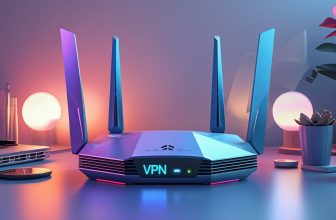
If the idea of your smart TV gossiping about you to strangers keeps you up at night, you’re not being paranoid — you’re being practical. Most cheap routers either hand your data to advertisers or hide useful settings behind a corporate GUI; the PW-AX1800 Wi‑Fi 6 Router (about $111.75) aims to fix that by putting VPNs, VLANs, ad blocking and mesh capability right where they belong: on the router itself.
This is a security-first box that speaks WireGuard, OpenVPN and IKEv2 (fancy words that mean your traffic can be encrypted), and its OpenWRT roots give you real control — think of VLANs as traffic bouncers that keep your smart fridge and work laptop from talking too much. It’s not a plug-and-forget solution — you may need extra mesh nodes for full-home coverage and a little patience to learn the ropes — but if you want router-level privacy without being locked into a corporate app, this is a compact, affordable way to take charge of your network.
PW-AX1800 Wi-Fi 6 VPN Mesh Router

A security-first router that gives you powerful VPN, VLAN and privacy tools without locking you into a corporate GUI. It’s great if you want to segment devices and run router-level VPNs, but plan on adding mesh satellites if you need blanket whole-home Wi‑Fi coverage.
- VPN & Security Features – 9.2
- Network Segmentation & VLANs – 9
- Wi‑Fi Performance & Mesh – 7.5
- Ease of Setup & Support – 8
Pros
- Built-in support for WireGuard, OpenVPN and IKEv2 for strong privacy
- Preconfigured VLANs let you isolate IoT, guest and work networks easily
- OpenWRT-based firmware gives power users deep control and ad blocking
- Mesh-capable Wi‑Fi 6 router with gigabit Ethernet for wired speed
- Includes parental controls, ad blocking and VPN client/server features
Cons
- Wireless signal strength can be modest — may need extra mesh nodes
- Advanced features can be overwhelming for non-technical users
- Limited ability to run multiple identical VPN tunnels of the same type
Quick orientation — what this router is for
You’re looking at a router that treats privacy and network control like first-class citizens. If you want to tunnel traffic through ExpressVPN (or another provider), isolate your smart plugs from your work laptop, block ads at the router, and run your own VPN server at home — this device is designed to make those things possible without needing to live in terminal windows.
What’s under the hood (plain English)
This router pairs modern Wi‑Fi 6 speeds with an OpenWRT-based firmware layer. That means you get the benefits of a widely used open-source platform (flexible features and transparency) while the vendor wraps it in a more approachable interface.
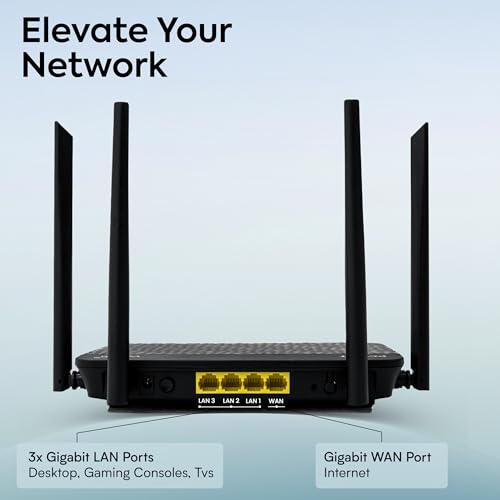
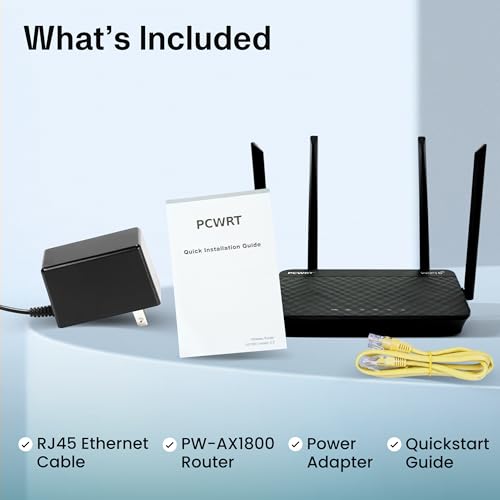
Key hardware and networking features include:
- Dual-band Wi‑Fi 6 (2.4 GHz and 5 GHz) for better multi-device handling
- Gigabit Ethernet ports for fast wired devices and uplink
- Built-in VPN client and server support (WireGuard, OpenVPN, IKEv2)
- Five preconfigured VLANs and per-port/SSID VLAN assignment
- Router-level ad blocking and parental control options
Handy specs at a glance
| Item | Detail |
|---|---|
| Form factor | Slim desktop router (approx. 8.25 x 5.5 x 1.25 in) |
| Weight | ~1.48 lbs |
| WAN/LAN | Gigabit Ethernet ports |
| Wireless | Dual-band Wi‑Fi 6 |
| VPN | WireGuard, OpenVPN, IKEv2 (client & server) |
| Special | VLANs, ad blocking, parental controls, mesh-capable |
Who benefits most
If you want to stop thinking about smart devices snooping around your network or you want to route only certain devices through a VPN (e.g., phone on VPN, streaming stick not on VPN), this router is for you. It’s also a great fit when you like tinkering with settings and want long-term control, not a throw-away consumer router.
Real-world performance notes (what to expect)
- VPN speeds: WireGuard is fast and typically preserves most of your ISP speed; OpenVPN is reliable and widely compatible but a bit slower.
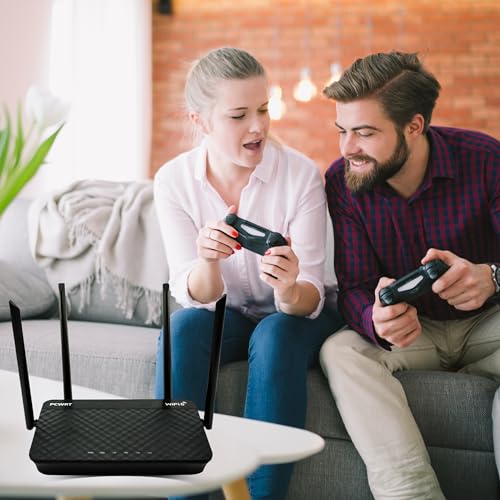
- Wi‑Fi coverage: The radios are fine for single-room or medium homes, but reviewers often pair it with dedicated mesh satellites (or existing mesh) for full-coverage in larger homes.
- VLANs: Implementing device isolation is straightforward thanks to per-port and per-SSID VLAN mapping — great for keeping IoT on lockdown.
Practical setup tips (so you don’t panic)
- Start by updating firmware and setting a secure admin password.
- Use the VLAN presets to separate IoT and guest networks before connecting many devices.
- If you plan to use a commercial VPN provider like ExpressVPN, upload the provider’s OpenVPN/WireGuard config files in the VPN client section.
- For whole-home Wi‑Fi, consider using the router as the VPN/security hub and add mesh satellites (either vendor mesh or another compatible system) to boost coverage.

Troubleshooting & realistic expectations
- If the web admin page is slow to load, try a firmware update and a wired connection for management.
- If you need multiple same-type VPN tunnels (e.g., several WireGuard tunnels assigned to different VLANs), the router may require creative setups or an additional device — this is an advanced edge case.
- Remember: router-level ad blocking is great, but some sites may misbehave; whitelist them as needed.
Final takeaways
You’re getting a privacy-minded router that empowers you to control who talks to who on your network, route traffic through provider or self-hosted VPNs, and block junk before it hits your devices. It’s slightly more hands-on than plug-and-play consumer routers, but if you’re willing to learn a few network basics, it rewards you with real control and peace of mind.
Where to Buy: Best Deals on pcWRT PW-AX1800


FAQ
Can I use this router with ExpressVPN or other commercial VPN services?
Yes — the router supports OpenVPN and WireGuard configurations, which most commercial services (including ExpressVPN, depending on provider support) offer. You usually upload the provider’s configuration files in the router’s VPN client area. If you get stuck, the usual steps are: get the config from your VPN provider, upload or import it in the router, set which LAN/VLAN should use the tunnel, and test with a connected device.
I have a bunch of smart plugs and cameras — how do I keep them from talking to my laptop?
Use the router’s VLANs and per-SSID/port assignment. Create a VLAN (for example “IoT”), put the smart plugs and cameras on that SSID, and enable inter-VLAN blocking so devices on that VLAN can’t reach your main devices. Think of VLANs like virtual fences — they keep animals (devices) in their own paddocks.
Is this router easy for non-technical people to use?
It’s more user-friendly than raw OpenWRT, but still aimed at people who want control. If you’re comfortable following a how-to or two (or using vendor support), you’ll be fine. Expect a steeper learning curve than simple plug-and-play routers, but rewardingly more capability once you learn the basics.
Do I need extra mesh units for a large house?
Probably. While the router is mesh-capable and Wi‑Fi 6 helps with device density, several users reported modest wireless range. For full coverage in a large or multi-story home, plan on adding satellites or integrating it with an existing mesh system.
Can this router block ads and trackers network-wide?
Yes — it includes router-level ad blocking. That blocks many ads and trackers before they reach your devices, saving bandwidth and reducing clutter. Keep an eye on sites that rely on ad scripts and whitelist them when needed.
What’s the difference between using the router’s VPN client vs a VPN app on my device?
Using the router-level VPN means everything routed through that router (or selected VLANs) is protected without installing apps on each device — good for TVs and IoT. Using a VPN app on a device gives device-specific control and can be easier for mobile devices when you leave the house. You can use both approaches depending on needs.



I bought the PW-AX1800 last month to replace an aging router and so far I’m impressed. Setup was a little nerdy (I had to tinker with the VPN client settings) but once configured it’s been rock-solid. Coverage is fine for a two-bedroom apartment, but I’d definitely add mesh nodes for a larger house.
I like that it doesn’t force a corporate GUI and gives real control over VLANs and ad blocking. For the price it’s a strong value if you care about privacy.
Totally agree about the GUI. Finally something that doesn’t try to hold my hand the whole time. Which mesh satellites are you pairing it with?
Thanks for the detailed note, Sarah — glad it’s working well. If you run into specific OpenVPN config issues, post the error and I can help walk through the settings.
If you want a true mesh that integrates at the router level, look for PCWRT-branded satellites or set the PW-AX1800 to AP mode and use a dedicated mesh kit. Mixing vendor meshes can be hit-or-miss.
I haven’t bought satellites yet — just planning. Any recommendations that play nice with third-party routers?
Short technical question: does the PW-AX1800 support wired backhaul between satellites? The review mentions adding mesh satellites for whole-home coverage but doesn’t deep-dive on backhaul options.
Yes, wired backhaul is supported if your mesh satellites and the main unit both have the necessary Ethernet ports and are configured accordingly. Wired backhaul will give you more stable speeds than wireless mesh linking.
Thanks — that’s what I hoped. Planning for a basement office so a wired backhaul will help.
I use Ethernet backhaul in my setup — total game changer. Speeds stay near gigabit for heavy streaming.
Advanced user chiming in: the VLAN support on the PW-AX1800 is genuinely useful for segmenting IoT devices from personal devices. I placed smart plugs and cameras on a separate VLAN with strict firewall rules and it’s been tidy.
One caveat: if you want fancy QoS for gaming + streaming, the QoS controls are functional but not as granular as some premium consumer routers. Still, for network security and VPN routing per-device, this is one of the best values.
Do you have any tips for setting up VLANs without bricking the router? 😅 I’m nervous to mess with network segmentation.
Awesome — I’ll post details later. Thanks both!
Start small: create one VLAN, test connectivity and firewall rules, and keep a backup of the config before major changes. There’s a learning curve but it’s manageable.
Great practical example, James. VLANs are indeed a major selling point for privacy-minded users. Thanks for sharing your setup details.
Agreed — export configs before major changes. If someone posts their VLAN use-case, I can outline a step-by-step example.
Nice write-up. I appreciate the security-first angle. A couple of things I’d like to see more info on: how easy is it to restore settings after a firmware update, and does the parental control allow time-based profiles per device?
I can confirm — I have schedules for my kid’s tablet. It’s a bit clunky to set up but works reliably.
Good questions. The router supports exporting/importing configuration files so restoring settings post-update is straightforward. Parental controls do support time-based rules per device, though the UI is manual — not as polished as some consumer-targeted systems.
I bought this because the price was right and I needed parental controls + VPN for remote work. Quick note: the client/server VPN modes are handy — I run ExpressVPN via the router and my home traffic is routed through it seamlessly. No more setting up VPN on every device.
How did you configure ExpressVPN? Any gotchas? I’m not very experienced with custom client configs.
Great to hear it’s serving both home and work use cases. Remember that routing all traffic through a VPN can add latency; you can also set per-device VPN rules if you only want certain devices tunneled.
Quick real-world question: my house is three floors. Will one PW-AX1800 + two satellites cover it, or should I look at a beefier router? I’m not super technical so prefer simpler setups.
I live in a two-story house with thick walls — had best success using one wired satellite per floor. Wireless-only linking struggled.
Three floors can be challenging. Two satellites might be sufficient depending on floor layout and construction materials. If you want minimal fuss, a higher-tier all-in-one mesh system might be easier, but if you want the PW-AX1800 security features, plan for wired backhaul between floors if possible.
Thanks both — wired backhaul sounds like more work but worth it for stability. I’ll check if I can run Ethernet between floors.
So it’s basically a privacy nerd’s dreambox, huh? 😂
Love that it supports OpenVPN and doesn’t shove a thousand extra ‘features’ nobody asked for. On the flip side, if you’re not comfortable with a little networking, this might feel like assembling Ikea furniture without instructions.
I also appreciated the ad blocking — stopped a bunch of sketchy domains on day one. Makes browsing less noisy.
I laugh at the ‘Ikea’ metaphor but it’s accurate. Took me an evening and a couple of forum threads to get everything perfect.
Ad blocking at the router level is convenient, but remember to whitelist sites you rely on. Some news sites break without allowing their ad domains.
As someone who is only moderately technical: I muddled through the setup with some trial and error. Worth it for the VPN features, imo.
Ha — fair description. It’s aimed more at people who want control and transparency. Casual users might prefer a more ‘plug-and-play’ consumer router.