
The Mesh Wi-Fi 6E Battle For Your Living Room!
Want blazing-fast Wi-Fi without the tech headaches—find out whether TP‑Link’s value-packed Deco XE75 or Amazon’s slick eero Pro 6E is the smarter pick for your home (and which one will actually fix your dead zones)?
You want whole-home Wi‑Fi that’s fast, fuss-free, and actually handles all your devices. This quick guide compares the TP‑Link Deco XE75 and Amazon eero Pro 6E so you can pick one that fits your home, budget, and tech comfort confidently.
Wide Coverage

8.8
You’ll get broad, reliable coverage and modern Wi‑Fi 6E speeds without needing to be a networking ninja. It’s a practical, cost‑conscious mesh that makes dead zones disappear — just don’t expect multi‑gig wired bells and whistles.
High Performance

9
You’ll love how painless setup and day‑to‑day management are — the app basically holds your hand. It’s aimed at people who want top‑tier 6E performance and seamless integration, but be ready to pay a premium for it.
TP-Link XE75 Mesh
- Coverage – 9
- Speed & Throughput – 8.6
- Ease of Setup – 9
- Features & Security – 8.6
eero Pro 6E
- Coverage – 8.6
- Speed & Throughput – 9.2
- Ease of Setup – 9.5
- Features & Security – 8.7
TP-Link XE75 Mesh
Pros
- Very wide coverage (advertised up to 7,200 sq. ft.)
- Good Wi‑Fi 6E performance across 2.4/5/6 GHz bands
- Straightforward app setup and mesh management
- Solid value for the hardware and coverage
eero Pro 6E
Pros
- Very easy, polished app and setup — great for non‑techy users
- Strong performance and support for up to 2.5 Gbps internet plans
- Dedicated 6 GHz band for Wi‑Fi 6E devices and lower latency
- Good compatibility with other eero devices and Alexa ecosystem
TP-Link XE75 Mesh
Cons
- No true multi‑gig Ethernet ports for futureproofing
- Some advanced settings are tucked away or less polished in the app
eero Pro 6E
Cons
- Higher price point compared with many competitors
- Some advanced security/reporting features behind paid subscription
Top Wi‑Fi Mesh Systems: Eero
Specs and features — the nuts and bolts (but in plain English)
Coverage & raw-speed claims
TP‑Link Deco XE75: TP‑Link says a 3‑pack covers up to 7,200 sq ft and rates it AXE5400 (that’s the marketing shorthand for the combined theoretical speeds across 2.4/5/6 GHz bands). Expect big coverage for multi‑room homes, but real throughput will be lower in practice.


What the 6 GHz band actually does for you
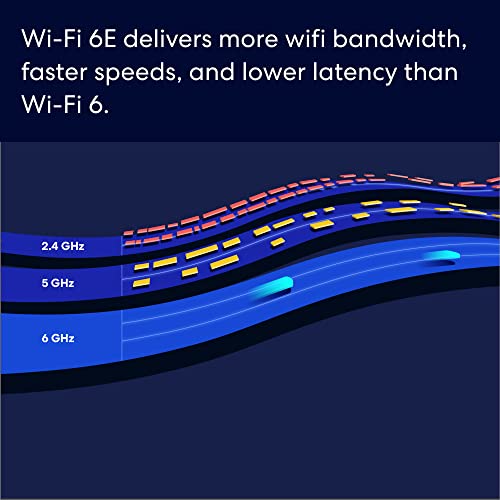
6 GHz is a newer, less-crowded lane. If you have Wi‑Fi 6E devices, you’ll get lower latency and less interference — great for cloud gaming, VR, or crowded apartments. Older devices still use 2.4/5 GHz, so 6 GHz helps offload the noisy stuff.
Device capacity and ports
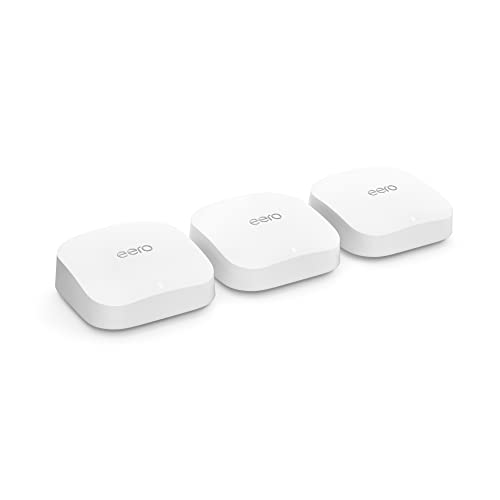
Amazon eero Pro 6E: eero advertises support for 100+ devices and “up to 2.5 Gbps” internet plans — that means it has multi‑gig capable WAN/LAN so you can actually feed a fast fiber connection.

Setup apps, security, and smart features
Both use simple phone apps. eero’s app is polished and beginner‑friendly; advanced security features live behind “eero Secure” subscription. Deco’s app is straightforward too, and TP‑Link advertises “AI‑driven mesh” that auto‑optimizes connections (useful, but not magic).
- Quick checklist:
- Coverage: Deco higher advertised sq ft; eero plenty for most homes
- Speeds: Deco labeled AXE5400; eero focuses on real multi‑gig WAN (2.5 Gbps)
- Devices: eero claims 100+; Deco handles many smart devices too
- Ports: eero = multi‑gig support; Deco = no true multi‑gig on base models
Feature Comparison Chart
| Features | TP-Link XE75 Mesh | eero Pro 6E |
|---|---|---|
| Wi‑Fi Standard | Wi‑Fi 6E (AXE5400) | Wi‑Fi 6E |
| Bands | Tri‑band: 2.4 GHz / 5 GHz / 6 GHz | Tri‑band: 2.4 GHz / 5 GHz / 6 GHz |
| Max Theoretical Throughput | AXE5400 aggregate (manufacturer rating) | Designed for multi‑gig plans; optimized throughput for 6E clients |
| Coverage (square feet) | Up to 7,200 sq. ft. (3‑pack) | Up to 6,000 sq. ft. (3‑pack) |
| 6 GHz Band | Yes — dedicated 6 GHz band for Wi‑Fi 6E devices | Yes — dedicated 6 GHz band with lower interference |
| Included Units | 3 units (identical nodes) | 3 units (mesh pack) |
| Ethernet Ports per Unit | 2 x Gigabit Ethernet ports per unit | 2 x Ethernet ports per unit (one supports higher speeds on some models) |
| Multi‑Gig WAN/LAN | No multi‑gig ports (Gigabit only) | Supports multi‑gig internet plans (up to 2.5 Gbps practical support) |
| Backhaul Options | Wireless mesh backhaul; supports wired backhaul if you run cable | Wireless mesh backhaul; supports wired backhaul if available |
| Max Concurrent Devices | Handles many smart‑home devices (practical home use) | Advertised for 100+ devices |
| App & Management | TP‑Link Deco app; easy setup, some advanced options in menus | eero app; very streamlined, first‑time friendly |
| Built‑in Smart Home Hub | No integrated Zigbee/Hub (focus on Wi‑Fi/IoT network segregation) | Integrates with Alexa; some eero models can act as smart home extenders |
| Security & Subscriptions | Built‑in security features; some advanced controls via app (no mandatory subscription) | Basic protections built‑in; advanced security and monitoring via subscription |
| Typical Price | $$ | $$$ |
Performance, setup, and everyday use — what to expect in your home
Real-world streaming, gaming, and dozens of smart devices
Both systems will happily stream 4K, handle Zoom calls, and keep smart lights responsive. Deco’s bigger advertised coverage helps in larger houses; eero shines if you have a multi‑gig internet plan or 100+ active devices. Expect occasional band steering as devices migrate between 5 GHz and 6 GHz.
- What you’ll notice day‑to‑day:
- 4K streaming: smooth on both (place nodes wisely).
- Online gaming/VR: lower latency on 6 GHz-capable devices.
- Many smart devices: eero handles device density cleanly; Deco offloads interference well.
TP‑Link Deco XE75 in everyday homes
If you want wide coverage without spending on multi‑gig hardware, Deco gives very good Wi‑Fi 6E performance across a big house — great for rooms far from the modem.


Amazon eero Pro 6E in everyday homes
If you have fast fiber (1–2.5 Gbps) or plan to upgrade, eero’s multi‑gig support and polished app make it easier to get consistently high wired/wireless speeds.

Latency and multi‑gig internet
For sub‑20 ms gaming, use 6 GHz-capable devices and place a node nearby. eero supports 2.5 Gbps WAN/LAN, so it’s a better match for multi‑gig plans; Deco lacks true multi‑gig ports on base units.
Setup, app, and firmware
Both use simple phone apps. eero’s app is more polished and integrates with Alexa; Deco’s app offers AI optimization. Firmware updates are automatic by default on both, but check settings after install.
Tips to avoid dead zones
- Place nodes in open areas, halfway between problem spots.
- Avoid putting nodes behind TVs or in cabinets.
- Use wired backhaul if possible for max speed.
- Run a quick speed test after moving a node.
Which one should you buy? Scenarios and smart recommendations
Best pick if you want top speed and multi‑gig plans
If you have 1–2.5 Gbps fiber or plan to upgrade soon, pick the eero Pro 6E. It supports 2.5 Gbps WAN/LAN and keeps speeds honest across wired and wireless devices.
Best pick for the easiest setup and smart‑home simplicity
Choose the eero Pro 6E if you want the smoothest app, Alexa ties, and a truly fuss‑free install. If you hate menus, this one holds your hand.
Best value for large homes
If coverage and price matter more than multi‑gig ports, the TP‑Link Deco XE75 (3‑pack) gives wider advertised range at a much lower price — great for spread‑out houses.
Best for many devices
If you connect 50–100+ smart devices, eero’s polished device handling and band management make life simpler; Deco still performs well but needs a bit more tuning.
Pros and cons at a glance
- TP‑Link Deco XE75 — Pros: big coverage, good Wi‑Fi 6E for the price. Cons: no multi‑gig ports, app less polished.
- Amazon eero Pro 6E — Pros: multi‑gig support, excellent app, great for dense device loads. Cons: pricier, some features behind subscription.
Budget vs future‑proofing (quick advice)
If price and coverage now matter: buy Deco. If you want the smoothest experience and multi‑gig readiness: buy eero.
Quick buy-or-pass
- Coverage priority: Buy Deco.
- Speed (multi‑gig) priority: Buy eero.
- Price priority: Buy Deco.
- Ease/smart‑home priority: Buy eero.
Final verdict — the bottom line
Deco XE75 wins for speed lovers, families — click Deco if you want performance, click eero for plug‑and‑forget ease.
Tip: update firmware first.




I bought the Deco because 7200 sq ft sounded like witchcraft. Turns out my apartment is only 900 sq ft, but hey — futureproofing? 😂
Ha! Futureproofing is a valid strategy. Even in smaller spaces a tri-band 6E mesh can reduce congestion if you have lots of devices.
Great roundup — thanks! I’d probably lean Deco XE75 just because of that 7200 sq.ft claim and the new 6GHz band. For a big house that coverage + AI-driven mesh sounds perfect.
That said, eero Pro 6E supporting up to 2.5Gbps is tempting if you have a super-fast plan. Anyone actually hit those speeds in real life with eero? Curious about real-world throughput when lots of devices are active.
I had eero Pro 6E for a month — with a 1Gbps plan I saw ~900Mbps on a wired device, ~400-600 on a phone depending on distance. Your mileage may vary!
Thanks, Karen — glad it helped! Real-world speeds depend a lot on wiring, ISP, and placement. eero can get close to advertised on wired backhaul or strong single-link connections, but mesh wireless hops will cut throughput some.
Deco’s 6GHz is great for new devices but remember old devices won’t use it. If your gadgets are mostly Wi‑Fi 6E, go Deco; otherwise eero’s simpler app and Alexa tie-ins are nice.
I live in a 3‑story townhouse and spent HOURS comparing these two.
– Deco XE75: loved the coverage claims (7200 sq.ft) and that Engadget shoutout. Setup was sorta easy, but had to fiddle with placement. 6GHz is awesome in the open rooms — crazy low latency on my laptop.
– eero Pro 6E: looked slick, app is super simple, and it handled a TON of smart home stuff. But I had a few dead spots on the back stairs unless I moved a pod nearer.
If you have lots of older devices the eero’s simple mesh felt more forgiving. If you want bleeding-edge speed for gaming/VR and have newer clients, Deco’s 6E band made a noticeable difference for me. YMMV! 😅
Also, FYI: some ISP modems act weird with mesh if you don’t put them in bridge mode. Had double NAT until I fixed that.
Thanks for this — I thought 6GHz was just hype. You convinced me to prioritize where I place nodes before jumping to buy.
Great real-world perspective, Ava. Good point about older devices — 6GHz helps only with compatible clients. Placement is often the biggest factor in mesh success.
Samir — yes! I hardwired one node to the router and that helped a TON. Worth the extra cable work imo.
Did you try wired backhaul? That fixed a lot of my stairway dead zones when I ran an ethernet line to one of the nodes.
Is 6GHz really a game changer or just marketing? My neighbor says it’s faster but doesn’t penetrate walls. 🤨
Pricing/security note for anyone comparing:
– eero has an optional subscription (eero Secure) for advanced security & parental controls — neat features but extra cost.
– TP-Link’s Deco has built-in security features depending on the model; sometimes the premium features are included.
I don’t mind subscriptions but wanted to point out total cost of ownership matters. Also: anyone had issues with firmware updates bricking units? Heard a scary story online 😂
Good catch, Sofia. Subscriptions can add up. Both brands do firmware pushes — rare issues happen but are uncommon; check forums for version-specific problems before large rollouts.
Subscription aside, I chose Deco because the included security felt more comprehensive for the price. ymmv!
I had an eero update hiccup once, but customer support pushed a recovery image and it was fine. Scary but not a dealbreaker for me.
Pro tip: backup your settings screenshots before updates. If something breaks you can at least restore your network config quickly.
Agree with Samir — snapshots/screenshots of settings are handy. And if you’re running critical services, stagger updates or test on one node first.
TP-Link also has HomeShield (some features free, some paid). I keep auto-updates off until I read recent threads — paranoid, I know 😅
Quick question: how do these compare on setup and ongoing app control? I want something my partner can manage without tech support calls every week.
Yep — if your partner just wants plug-and-play, eero’s UI is cleaner. Deco gives more control if you like tweaking QoS, VLANs, etc.
eero is generally praised for a very user-friendly app and simple onboarding — nice for non-technical users. Deco is also friendly but offers more advanced settings which might be slightly more to poke through.