
RE600X vs. EAX15: Specs, Performance, and Value Compared
Can the RE600X really rescue your dead zones or is the EAX15 the wallet‑friendly hero that finally stops your Wi‑Fi from ghosting you — here’s how to pick the one that actually fixes your signal?
Fed up with dead zones? You want faster Wi‑Fi in the rooms that matter without a tech headache. This quick, friendly comparison cuts through jargon to show whether the TP‑Link RE600X or NETGEAR EAX15 suits your home, devices, and patience.
Budget Booster

7.5
You get a sensible, budget‑friendly Wi‑Fi 6 boost that fixes dead zones without forcing you to rewire the house. It’s easy to tuck into a wall outlet, and the Ethernet port gives you a reliable access‑point option if you want faster, wired backhaul.
Seamless Mesh

8
You’ll like how this one quietly smooths roaming and keeps multiple devices happy without fuss. It’s a neat, modern extender if you want a simple plug‑and‑play way to stretch Wi‑Fi into the corners of your home.
TP-Link RE600X
- Coverage – 8
- Throughput – 7.5
- Ease of Setup – 7
- Features & Security – 7.5
Netgear EAX15
- Coverage – 8
- Throughput – 8
- Ease of Setup – 8
- Features & Security – 8
TP-Link RE600X
Pros
- Solid AX1800 Wi‑Fi 6 performance for the price
- Gigabit Ethernet port lets you use it as an access point
- OneMesh compatibility helps if you already use TP‑Link gear
- Compact plug‑in form factor that’s easy to place
Netgear EAX15
Pros
- Seamless smart roaming/One‑Wi‑Fi‑Name experience with many routers
- Solid AX1800 speeds and modern Wi‑Fi 6 efficiency
- Easy wall‑plug installation and a tidy form factor
- WPA3 support and up‑to‑date security features
TP-Link RE600X
Cons
- Setup can be a little confusing if you mix app/web methods
- Not the absolute fastest in real‑world throughput compared with higher‑end extenders
Netgear EAX15
Cons
- May lack a wired Ethernet port depending on the exact model
- Covers mid‑size homes but isn’t a replacement for a full mesh system for very large houses
How to Set Up a NETGEAR WiFi Extender: Quick and Easy Guide
Real‑World Performance: Speed, Coverage, and Reliability
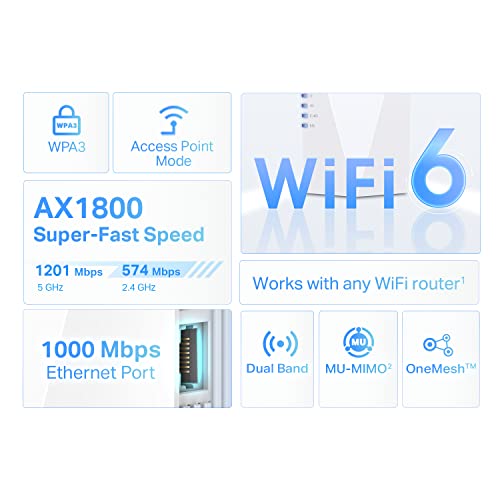
What “AX1800” and “up to 1.8 Gbps” mean for you
AX1800 is marketing shorthand: combined top theoretical throughput on both bands adds up to ~1.8 Gbps. In real life you’ll see a few hundred Mbps near the extender, and much less through walls. “Up to 1.8 Gbps” is a peak number — useful to compare tech, not a promised home speed.
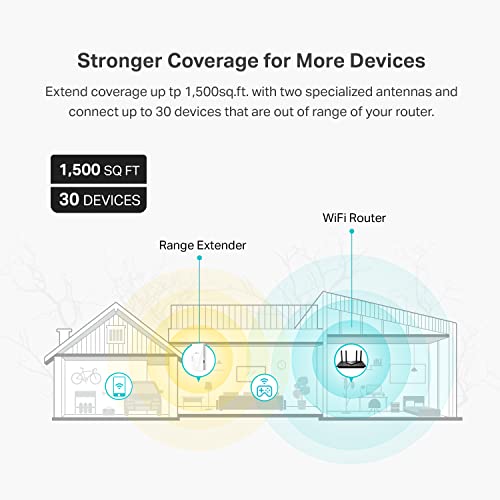
Coverage: 1,500 sq.ft. — how that maps to rooms
Think of 1,500 sq.ft. as a guideline: a two‑bedroom apartment or a 3–4 room path in a house (living room, kitchen, one or two bedrooms). Thick walls, floors, or long hallways shrink that. TP‑Link RE600X’s plug‑in design is easy to place in a central outlet for best results.
Devices, latency, and everyday use
TP‑Link lists ~30 devices, NETGEAR ~20 — that’s about how many light devices (phones, bulbs, cameras) they can manage before things get laggy. For streaming, video calls, and light gaming expect stable 30–200 Mbps and pings in the 20–60 ms range nearby; distant rooms may be slower.


Wi‑Fi 6 features made simple
OFDMA = the extender sends small packets to many devices at once (less waiting). MU‑MIMO = it talks to several devices simultaneously. Result: smoother video calls and multiple streams without every device yelling for attention.
Quick tests to run with your phone
- Run Speedtest near router, then near extender.
- Stream a 4K clip and a video call simultaneously in the same room.
- Walk away to the far room and repeat; note speeds and stutter.
Features & Setup: What You’ll Actually Use
TP‑Link RE600X — practical bits
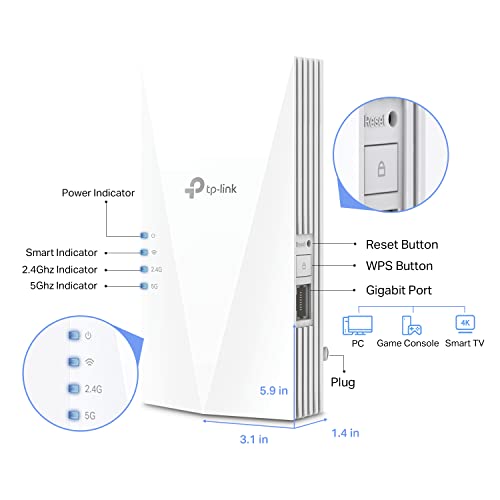
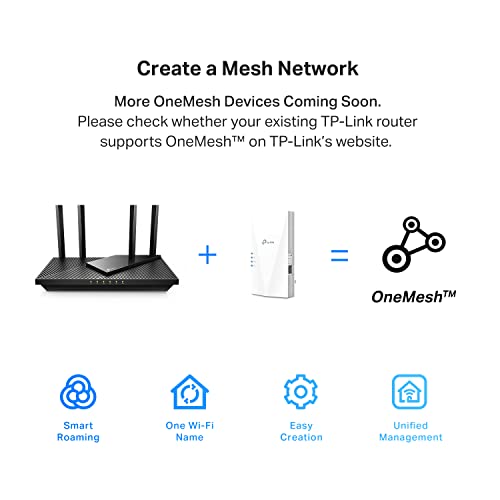
RE600X gives you OneMesh compatibility (only if your router is TP‑Link OneMesh‑capable), an AP mode and a gigabit Ethernet port so you can plug a game console or switch for the fastest possible link. If you use a non‑TP‑Link router expect a separate extender SSID unless you manually match names.
NETGEAR EAX15 — practical bits
EAX15 pushes the “One Wi‑Fi Name”/smart roaming angle: it usually joins your existing SSID so devices roam without manual switching. It also includes WPA3 support for newer‑device security. Some EAX15 SKUs skip a wired Ethernet port, so check the listing if you need one.


Setup, common gotchas, and placement
- Typical setup: plug near router, run the app or web wizard, let it copy or join your SSID, then move it to the gap area.
- Gotchas: mixing app and web setup can confuse firmware; pick one method. If you want a single SSID, use OneMesh (TP‑Link router required) or EAX15’s smart roaming.
- Placement tips: put it halfway between router and dead zone, in open space (not a closet), away from microwaves, heavy metal, and the floor.
AP mode vs extender mode — quick rule
- Use AP mode when you can run Ethernet for best speeds.
- Use extender/repeater mode when you need wireless-only coverage quickly and can tolerate a bit of speed loss.
Feature Comparison
| Features | TP-Link RE600X | Netgear EAX15 |
|---|---|---|
| Model | RE600X | EAX15 |
| Wi‑Fi Standard | Wi‑Fi 6 (802.11ax) | Wi‑Fi 6 (802.11ax) |
| Max Theoretical Speed | AX1800 (up to 1.8 Gbps combined) | AX1800 (up to 1.8 Gbps combined) |
| Bands | Dual‑band (2.4 GHz + 5 GHz) | Dual‑band (2.4 GHz + 5 GHz) |
| Coverage (sq.ft) | Up to 1,500 sq.ft. | Up to 1,500 sq.ft. |
| Max Devices Supported | Up to 30 devices | Around 20+ devices |
| Ethernet Ports | 1 x Gigabit Ethernet port | Typically none (model dependent) |
| Backhaul Type | Wireless (can use 5 GHz as backhaul); supports wired AP mode | Wireless (optimized for mesh/roaming) |
| Mesh Compatibility | OneMesh (TP‑Link) | Smart roaming / One Wi‑Fi Name (NETGEAR) |
| Security | WPA2 / WPA3 | WPA3 |
| Form Factor | Wall‑plug / compact | Wall‑plug / compact |
| Setup Method | TP‑Link Tether app + web GUI | NETGEAR app + web GUI |
| Manufacturer Warranty | 2‑year limited | 1‑year limited |
| Approx. Price | $$ | $$ |
| Release Date | December 23, 2021 | October 13, 2020 |
| Product Dimensions | 1.4 x 3.1 x 5.9 inches | 7.2 x 4.3 x 4.6 inches |
| Item Weight | 8.2 ounces | 7.8 ounces |
Value, Use Cases, and Who Should Buy Which
Cost‑to‑Benefit & device limits
Both are close in price (around $80–$85) and cover ~1,500 sq.ft. The TP‑Link RE600X gives you a gigabit Ethernet port and supports up to 30 devices — better if you plan wired consoles or lots of gadgets. The NETGEAR EAX15 lists support for ~20 devices and often includes WPA3 and nicer “one Wi‑Fi name” roaming.
Security & future‑proofing
EAX15 explicitly includes WPA3, which is handy if you care about newer security standards. RE600X is Wi‑Fi 6 and OneMesh‑friendly (great if you already use TP‑Link gear) and edges out on wired AP mode — useful for future-proofing a wired connection.
Best fit by household
- Apartments: EAX15 — simple wall‑plug, single SSID roaming, and WPA3 make setup painless.
- Multi‑room homes: RE600X — use AP mode or OneMesh if you want a wired backbone or more device capacity.
- Smart‑home setups: RE600X — supports more devices (30) so your bulbs, cams, and sensors are happier.
- Casual gamers: RE600X — gigabit Ethernet port lowers lag for consoles/PCs.
Quick decision rules
- Pick RE600X if you need a wired port, plan lots of devices, or use TP‑Link OneMesh.
- Pick EAX15 if you want seamless roaming, WPA3, and the simplest plug‑and‑forget setup.
Still undecided?
Buy the one that matches your router brand or return within the seller’s window — both are cheap enough to test and swap if it doesn’t fit your home.
Final Verdict — Which One Should You Buy?
For a simple, budget‑friendly boost and a bit more device room, buy the TP‑Link RE600X — it’s the practical pick for most homes.
If you value mesh‑style roaming, WPA3 security, and NETGEAR’s higher top‑speed claim with one Wi‑Fi name, pick the EAX15. Quick next steps: check your router for OneMesh/mesh or WPA3 compatibility, then place the extender halfway between router and the dead zone (clear line of sight if possible). Ready to boost now?





Real talk: had a Netgear extender (not EAX15) that bricked after a firmware update once. Customer support was slow but eventually replaced it. The lesson: always check return policy and keep receipts. 🙃
I’ve seen firmware bricking rare but real. Good point to be cautious.
Netgear support was okay for me but took longer than TP-Link once. YMMV.
Sorry you had that experience — firmware issues can happen. Look for retailers with good return windows and check community forums before major firmware installs if you’re risk-averse.
Question: does anyone know if Netgear’s “One WiFi Name” actually merges SSIDs or just auto-roams? I want seamless handoff between router and extender for Zoom calls.
For super smooth roaming you need compatible client devices — newer phones and laptops are better at it.
My phone did a seamless switch on calls between router and extender, but older laptops sometimes stuck to the weaker signal.
“One WiFi Name” generally means the extender uses the same SSID as the main network to simplify connections, and it can help with roaming, but true fast roaming depends on client support of 802.11k/v/r. So Zoom handoffs improve but aren’t guaranteed.
I was tempted by Netgear because of WPA3 and the “One WiFi Name” convenience, but heard their apps push ads. Anyone else notice annoying pop-ups in the Netgear app? Kinda hate that.
I turned off updates and notifications on Android and it stopped. Small victory 😄
Yes, their app showed me offers once. Not a dealbreaker but annoying. You can often ignore/disable notifications in settings though.
Some users have reported promotional messages in Netgear apps. It’s not universal and sometimes depends on firmware/app version. Worth checking recent reviews in app stores before buying.
Small rant: reviewers use lab numbers but don’t show typical apartment interference. My building has neighbors on every channel. The Netgear managed to give me more stable 5GHz throughput vs my old extender, but I had to play with channel settings a bunch. Worth the tweak if you’re in an apartment.
I used a free Wi-Fi analyzer on Android and moved the extender 2 feet to get a better channel. Made a big diff!
Lol moving 2 feet solves 90% of RF issues 😀
Agreed — real-world interference matters. Try automatic channel selection first, then manual scanning (Wi-Fi analyzers) to pick less crowded channels.
Long story short: I got the RE600X last month and the Wi-Fi 6 improvements are noticeable, especially when multiple phones are on video calls. Super stable. Below is a slightly longer note:
– Setup: surprisingly easy, used the app.
– Coverage: filled a dead spot in my house.
– Downsides: occasional reboots after firmware updates, but contact with support fixed it.
Highly recommend for small-medium homes with mixed devices.
Thanks for the detailed experience — practical notes like firmware reboots help others weigh pros/cons.
Firmware quirks are common across brands. Always backup settings when possible and wait a few days after new firmware drops if you’re careful.
Which router are you pairing it with? I worry about mixing brands for stability.
PSA: if you’re using gaming consoles, check the ethernet passthrough. The RE600X has a gigabit port — perfect for my PS5. Netgear’s speed claim sounds good (1.8Gbps) but I couldn’t find a dedicated LAN on their cheaper extenders? Anyone confirm?
EAX15 specs show it as a WiFi 6 range extender but many models in that class include at least one Ethernet LAN port. Always check exact SKU specs before purchase. For lowest ping use wired backhaul where possible.
EAX15 does have an Ethernet port in some retailer listings, but double-check — Netgear sometimes sells region variants. The TP-Link gigabit port is nice for console/streaming.
For PS5 I recommend wired to the extender then mesh for Wi-Fi devices. Lower latency for sure.
Comparing price-to-performance: the TP-Link usually undercuts Netgear slightly price-wise. If your budget is tight and you want OneMesh compatibility and a gigabit port, RE600X is often the best value. Netgear’s edge is WPA3 and some QoS tweaks in their UI.
Price and features weigh heavily — TP-Link often offers strong value, Netgear often includes a couple security/UX extras. Decide based on which feature matters more to you.
Also watch seasonal sales; sometimes Netgear drops into the same price range as TP-Link.
Exactly — I chose TP-Link for price/value; WPA3 was nice but not essential for my needs.
Funny how both claim 1500 sq.ft coverage but the TP-Link says 30 devices vs Netgear 20. If you have a smart-home full of junk like me (lightbulbs, plugs, cameras), that 30-device claim actually matters. Anyone tested both with lots of IoT devices?
I have ~25 devices and an RE600X — handles basic IoT fine, but heavy streaming + many devices can saturate. The “30 devices” is a guideline; real-world depends on traffic per device.
Good point — manufacturer device counts assume light usage per device. If several stream 4K or have frequent uploads, you’ll hit throughput limits sooner. Mesh extenders help spread load but don’t create unlimited capacity.
I swapped to a mesh router in the end because the single extender still bottlenecked when cameras uploaded. So for many active devices, consider full mesh or stronger router first.
Nice breakdown — helped me decide between the two. I liked that the TP-Link (RE600X) supports OneMesh since I already have a TP-Link router. The gigabit port is a big plus for my wired TV.
Only thing: does anyone know if the AP mode is easy to set up? I’m not super techy. 😅
I set mine up last month — plug in, go to tplinkrepeater.net, follow the wizard. Took like 7 mins. If you have Deco or another TP-Link, OneMesh will be smooth.
TP-Link app walked me through it. If you hit a snag, try factory reset and start over — that weirdly solved it for me once.
AP mode is usually straightforward: you connect the extender to your router via Ethernet, then follow the setup in the app or web UI. For TP-Link it’s typically labeled “Access Point” during setup — takes 5–10 minutes.
LOL I bought the cheapest extender last year and regretted it. Reading this post feels like therapy — should I upgrade to one of these for better WFH reliability? My occasional drops are killing me.
If drops affect calls and work, upgrading to an AX1800-class extender like these will likely help, but also consider router placement and interference. If you have many devices, a true mesh system or wired backhaul can be even better.
If budget is tight, try the RE600X first — good balance of features and price. If issues persist, consider a mesh kit down the line.
Also make sure your ISP modem isn’t the bottleneck — sometimes the modem/router combo is ancient and causes drops.
I laughed at the marketing numbers — “up to 1.8 Gbps”… yeah, when pigs fly. 😂 Real world will be lower but still, between these two, who has better real-life speed?
In my apartment the Netgear was slightly faster on 5GHz when close, but TP-Link reached farther on the 2.4GHz band. Your mileage will vary.
True — “up to” numbers are theoretical link rates, not sustained throughput. Both are AX1800 class, so expect similar throughput in similar conditions. Placement, interference, and wired backhaul make a bigger difference.
Neutral take: If you’re on a TP-Link ecosystem, RE600X is the easy pick; if you want WPA3 and single SSID behavior, Netgear makes sense. I switched from TP-Link to Netgear for a friend and both worked fine. No fireworks.
Yep, ecosystem compatibility saved me time. OneMesh devices just appeared as an option in my router GUI.
Good summary — ecosystem and feature priorities (WPA3, OneMesh vs One WiFi Name) often decide the buyer. Both deliver basic AX improvements over old extenders.