

VLANs — Want to keep your Smart Fridge from eavesdropping on your Zoom calls?
Your router is the bouncer for your home network. If you let everything mingle, your baby monitor, work laptop, and smart toaster can all see each other. That’s awkward — and unsafe.
VLANs are like VIP ropes: they clearly separate guests, IoT, and work devices so each group can’t wander where it shouldn’t. They sound techy, but you can set them up with friendly gear — no tears or soldering iron required.
Top VLAN Picks


UniFi Dream Router 7 — Desktop 10G Gateway
You get a powerful, compact gateway that replaces several network boxes and centralizes management. It’s packed with modern ports, Wi‑Fi 7, and a full UniFi app stack — great if you want pro-level control without a rack of gear.
Pros
- Integrated Wi‑Fi 7 access point with 6 GHz support
- 10G SFP+ WAN option and 2.5 GbE WAN port for fast internet
- Built‑in UniFi controller and microSD storage for local management
- Replaces multiple devices (router, switch, controller) for tidy setups
Cons
- Some UI complexity — casual users will face a learning curve
- Not the cheapest option if you only need a basic home router
What this device is for
The Dream Router 7 is aimed at folks who want one box to do the work of several: routing, switching, Wi‑Fi, and UniFi device management. If you’re tired of having a separate router, PoE switch, controller appliance and wonder why your home network looks like a spaghetti museum, this box is built to tidy things up.
Key features and why they matter
- Integrated 6‑stream Wi‑Fi 7 AP with 6 GHz support
- 10G SFP+ plus 2.5 GbE WAN port for high‑speed uplinks
- 4‑port switch with one PoE port and microSD local storage
- Full UniFi application suite onboard for device management
The real benefit is consolidation: fewer boxes, a single management UI, and modern ports so your ISP pipe doesn’t bottleneck. In plain English — you get faster wired throughput, future‑proof wireless, and a UI that lets you see who’s doing what on the network.
Realistic benefits and a few practical tips
You’ll enjoy near‑ISP speeds over Ethernet, much better Wi‑Fi in many homes, and the ability to manage dozens of devices from one place. Expect a short learning curve if you’ve only used consumer routers — but once you know where things live in the UniFi UI, it’s satisfying.
- Tip: Use the UniFi app’s setup wizard (Bluetooth helps) and keep SSIDs consistent when migrating from older UniFi gear.
- Tip: If you use advanced features (VLANs, firewall rules), plan time to read a couple short guides — it pays off.
Limitations and who should consider alternatives
If you just want a plug‑and‑play box for a tiny apartment with basic needs, this might be overkill and pricier than simple consumer routers. Also, advanced features can be overwhelming — but that’s only a problem if you like absolute zero reading. Overall, this is a superb option if you want a compact, powerful hub that grows with your home network.
ASUS RT‑AX88U AX6000 — Gaming & Power
You get a rock‑solid Wi‑Fi 6 router with excellent throughput, lots of ports, and robust software features for QoS, VPNs and security. It’s a top pick if you want both speed and advanced network controls.
Pros
- High performance Wi‑Fi 6 with excellent range and stability
- Eight LAN ports for many wired devices without a switch
- Rich firmware features: QoS, AiProtection, VPN, and logging
Cons
- Older model compared to newest Wi‑Fi standards (no 6E/7)
- Higher price than basic consumer routers
What makes this router stand out
The RT‑AX88U is a veteran favorite for people who want speed, reliability, and a deep set of features. If you enjoy tweaking QoS, running VPN clients, or need many wired ports for consoles and NAS boxes, this router gives you those tools in a polished package.
Important features in plain English
- Wi‑Fi 6 performance for faster wireless throughput and better handling of many devices
- Eight gigabit LAN ports so you don’t need an extra switch for wired clients
- Lifetime security features and adaptive QoS to prioritize games or streaming
So: the router is like a Swiss Army knife for home networks — plenty of blades and they’re all useful for serious home networks.
Practical benefits and tips
Expect stable performance even with dozens of devices; it’s common to see it run for months without needing a reboot. The web UI is friendly and powerful. If you want to pair it into a mesh, Asus AiMesh supports that, or you can pair two devices for broader coverage.
- Tip: Enable AiProtection and set up Adaptive QoS to keep gaming and video smooth during heavy network use.
Who might skip this one
If you only need a simple plug‑and‑play router for a small apartment, this is likely overkill. But if you value stability, many wired ports, and extensive firmware features, it’s a great long‑term investment.
ASUS RT‑AX86U AX5700 — Gaming Focused Router
You get strong Wi‑Fi 6 performance, a dedicated gaming port, and helpful software like Instant Guard and mobile game mode. It’s a top choice when low latency and responsive controls matter.
Pros
- High Wi‑Fi 6 speeds and strong real‑world performance
- Gaming‑focused features: gaming port and mobile game mode
- 2.5G port and AiMesh compatibility for expansion
Cons
- Can be pricier than entry‑level routers
- Advanced features might be unused by casual users
Who this is for
If you play online games or want a router that prioritizes low latency for certain devices, the RT‑AX86U brings dedicated gaming features and excellent wireless performance. It also works well for households with a mix of gamers and streamers.
Standout capabilities
- Wi‑Fi 6 (AX5700) throughput with 160 MHz channel support
- 2.5G port and an ethernet gaming port to prioritize a single device
- Instant Guard, AiProtection, VPN options, and AiMesh compatibility
In plain English: this router helps keep your game console or PC at the front of the line when everyone else is streaming video and doomscrolling social media.
Practical advice
Setup is straightforward via the ASUS app or web UI. Use the gaming port to prioritize a console, and enable Mobile Game Mode to reduce latency for handheld devices. If you later need more coverage, AiMesh lets you add compatible ASUS units.
Limitations
It’s not the cheapest router around and some of the advanced functions are most useful for power users. But if you want a router that balances gaming features with everyday robustness, this is a sensible pick.
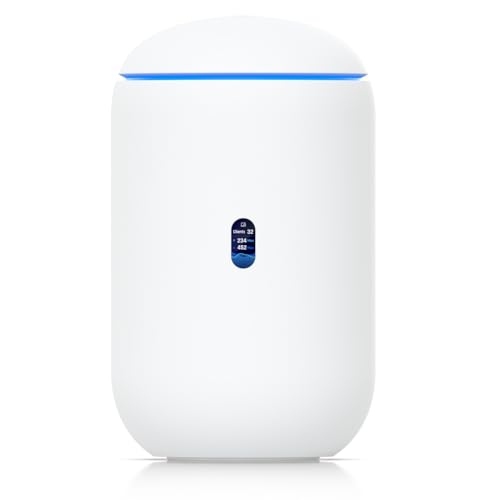
UniFi Dream Machine — Easy Home Controller
You get an approachable, single‑box way to enter the UniFi ecosystem with solid performance and easy management. It’s a great pick if you want enterprise‑style features without a steep setup headache.
Pros
- All‑in‑one design: AP, switch, and security gateway in one box
- Intuitive UniFi controller with lots of useful features
- Built‑in IDS/IPS and DPI for improved security and visibility
Cons
- Wireless is 802.11ac (not Wi‑Fi 6/7) — less future‑proof
- Limited advanced port options compared with more modular gear
Who this fits
This Dream Machine is ideal when you want the UniFi experience without buying separate pieces. It’s perfect for a small-to-medium home or a small office where you want easy management and some advanced security features, but don’t want to wrestle a rack or CLI.
What it brings to your network
- Dual‑band 802.11ac 4x4 Wave 2 access point
- Managed 4‑port gigabit switch and security gateway with IDS/IPS
- UniFi Network Controller baked in for device visibility and control
In everyday terms: plug it in, follow the simple setup, and you’ll have more visibility into devices and better control over guest networks, parental schedules, and firewall rules than a typical consumer router provides.
Practical usage notes
If you already have UniFi APs you can expand easily; if not, the built‑in AP often covers a typical house. You’ll particularly like features like scheduled Wi‑Fi for kids or easy VPN configuration. The device is friendly for beginners, but still hides professional features under the hood when you need them.
Tradeoffs to consider
This is not the fastest future‑proof AP (no Wi‑Fi 6/7), so if you want the very latest wireless speeds and 6 GHz band support, look at newer models. But for most households that care more about stable coverage and a clean management interface, this is a solid, low‑stress pick.
Deco XE75 Tri‑Band Wi‑Fi 6E Mesh System
You get seamless coverage across multiple floors with the new 6 GHz band for less interference. It’s a practical, budget‑friendly way to add Wi‑Fi 6E without needing a ton of technical tinkering.
Pros
- Supports Wi‑Fi 6E with 6 GHz band for cleaner channels
- Good coverage for large homes and multi‑level houses
- Easy app‑based setup and stable mesh roaming
Cons
- Power adapters are bulky and cords can be short
- Some Wi‑Fi 7 devices may not show full next‑gen features
Quick overview
The Deco XE75 is a two‑pack Wi‑Fi 6E mesh meant to erase dead zones in larger homes. It adds a 6 GHz band which helps reduce congestion from older devices and gives you cleaner backhaul and faster links for modern clients.
Feature snapshot
- Tri‑band Wi‑Fi 6E with dedicated 6 GHz band
- AI‑driven mesh that hands off devices smoothly between nodes
- Covers large homes (advertised up to ~5,500 sq. ft for a 2‑pack)
In plain words: the 6 GHz band is like opening a new, quiet street for your fastest devices while legacy gear stays on the older, busier roads. That means less buffering during big streaming or gaming sessions.
Practical tips and benefits
You’ll appreciate the straightforward setup — if you can use a smartphone, you can set this up quickly. The mesh works well in multi‑story homes and with large device counts; it’s one of the easier ways to future‑proof your wireless without breaking the bank.
- Example: If your family streams 4K and also has smart home devices, put one node near living areas and another central upstairs for best handoffs.
Limitations
The hardware is solid but the physical power bricks can be annoying (they’re large). Also, Wi‑Fi 7 devices won’t get Wi‑Fi 7 speeds — for that you’d need a newer, more expensive mesh. But for most households, this is a practical upgrade that reduces headaches and dead spots.
Ubiquiti EdgeRouter X — Compact Gigabit Router
You get a tiny, affordable router with serious routing features (VLANs, QoS, routing protocols) — ideal if you want control and performance on a budget. It’s not plug‑and‑play, but powerful if you’re willing to learn.
Pros
- Excellent routing features and VLAN support for segmentation
- Very cost‑effective with solid gigabit throughput
- Compact form factor with PoE options for flexibility
Cons
- Not beginner‑friendly; setup requires familiarity or careful following of guides
- Less polished UI compared with consumer routers
What the EdgeRouter X does best
This compact unit brings reliable routing and advanced features to small offices or enthusiasts without costing much. If you want real VLANs, static routes, firewall rules and even routing protocol support on a budget, this device delivers.
Key technical points (in plain English)
- VLAN interfaces for network segmentation and better security
- Support for static routes and routing protocols like OSPF/RIP/BGP
- Firewall policies, DHCP services, QoS and PoE power options
Put simply: you can split your home network into neat sections (guests, IoT, work) so your smart toaster can’t poke at your work laptop. That’s a huge security win for a small price.
Practical guidance and tips
If you’re comfortable setting static IPs and following a short setup checklist, you’ll be fine. For beginners, follow a clear step‑by‑step tutorial: assign a temporary static IP to a laptop, run the setup wizard, and then move on to more advanced rules. The CLI is available if you want fast, precise control.
- Example: Use VLANs to keep cameras and smart devices on a separate subnet so a compromised bulb won’t see your personal files.
Limitations
This isn’t a plug‑and‑play box for someone who expects a simple phone app setup. The tradeoff is power: you get enterprise‑grade control for a consumer price, but you’ll need to invest a little time up front. If you want absolute simplicity, a consumer AP/router might be a better fit; if you want power and low cost, this is a great option.
TP‑Link Archer AX80 AX6000 Dual‑Band Router
You get strong Wi‑Fi 6 performance with multi‑gig WAN/LAN and long range from eight high‑gain antennas. It’s a good choice if you want solid coverage and extra ports without moving to a mesh.
Pros
- Wi‑Fi 6 speeds and long range with beamforming
- 2.5G multi‑gigabit port for faster ISP connections
- OneMesh and AP mode for flexible network setups
Cons
- Some advanced features can cause instability for specific setups
- Not all ISP setups (e.g., Starlink) can be swapped in seamlessly
Who should consider this router
Choose the Archer AX80 if you want robust Wi‑Fi 6 coverage from a single box and the convenience of a 2.5G port for faster internet feeds. It’s aimed at busy homes with many devices and streaming or light gaming needs.
Notable specs and what they mean
- Dual‑band Wi‑Fi 6 with up to 4804 Mbps on 5 GHz and 1148 Mbps on 2.4 GHz
- Eight high‑gain antennas and beamforming for better coverage
- 2.5G Multi‑Gig port and support for OneMesh/AP mode
Translated: the antennas and beamforming help push signal into farther rooms, and the 2.5G port keeps your ISP connection from becoming the slowest link in the chain.
Practical usage and tips
It’s easy to set up using TP‑Link’s interface, and features like an integrated speed test can be handy. If you have a lot of IoT devices, separate guest/IoT networks improve security and stability. Some users have reported issues when replacing certain ISP‑provided routers (like Starlink) — those are edge cases tied to specific ISP behaviors.
Downsides to be aware of
This is not a mesh, so very large homes may still need additional access points. Also, complex or unusual ISP setups may require extra configuration. For most folks who want a strong single‑box solution, this router hits the sweet spot between performance and price.
NETGEAR Nighthawk RAX120 AX6000 Router
You get a speedy Wi‑Fi 6 router with multi‑device capacity and a 5G multi‑gig port, but some users report occasional reboots and setup headaches. Good if you need raw performance and are comfortable troubleshooting.
Pros
- AX6000 speeds and 12‑stream capability for many devices
- Large antenna array for wide coverage and beamforming
- Multi‑Gig 5G port for future ISP options
Cons
- Some users report random reboots or instability over time
- Setup via the app can frustrate users — wired setup recommended
Who might choose the RAX120
This router aims at users who want raw speed and lots of simultaneous device capacity. If you have heavy streaming, many smart devices, or want a multi‑gig connection someday, it can be attractive — but be prepared to do some troubleshooting if firmware quirks appear.
Feature highlights
- 12‑stream Wi‑Fi 6 (AX6000) with eight high‑gain antennas
- 5G multi‑gig port and strong processor for smart home tasks
- Beamforming+ to help signals stay focused on devices
Translation: it’s a performance‑first router with a broad feature set for power users, but that performance doesn’t always translate to flawless plug‑and‑play experiences for everyone.
Practical notes and tips
If you buy one, consider initial wired setup via a PC rather than relying solely on the phone app — many users found that smoother. Keep firmware updated and monitor for reboots; many reports of issues are fixed by firmware updates, but some units have shown recurring problems.
Tradeoffs
For people who prefer a highly stable, low‑maintenance home network, alternatives with fewer reported issues might be better. If you primarily want top wireless throughput and are comfortable troubleshooting, this router can deliver big speeds.
Final Thoughts
Best all-in-one: UniFi Dream Router 7 — Pick this if you want a single compact box that gives you PRO-level control without turning your living room into a server closet. Strengths: easy-to-use UniFi app and controller, modern ports, built-in Wi‑Fi 7, and straightforward VLAN/guest network setup. Ideal for families with lots of Wi‑Fi devices who want simple GUI-based VLANs. Actionable step: buy it, enable a VLAN for IoT and a separate VLAN for work in the UniFi controller, and add a UniFi managed switch if you need more wired VLAN ports.
Best budget power-user option: Ubiquiti EdgeRouter X — Choose this if you like low cost and maximum control and don’t mind a little learning. Strengths: very affordable, rock-solid routing features (VLANs, QoS, static routes) and low power use. Ideal for tech-savvy users who want granular VLAN rules for wired gear or to segment a home lab. Actionable step: pair it with a managed gigabit switch, create VLANs in EdgeOS (web UI or CLI), and test by assigning a separate SSID on a Wi‑Fi access point to the VLAN for easy separation.

Quick take: I mixed an Archer AX80 with a smaller mesh for dead spots and it worked surprisingly well. The AX6000 Archer has been solid for streaming and the 2.5Gb WAN was handy when my ISP upgraded.
Sarcastic summary: buy the fastest blinking box and pray. Or buy something sensible like the AX80 and live happily. 😜
Agreed — I did a similar setup and it fixed the upstairs lag. Glad I didn’t chase the fanciest box.
Nice combo approach, David — many users get the best of both worlds by pairing a strong router with targeted mesh/extenders. The AX80’s multi-gig is a real advantage if you want to future-proof.
I almost bought the NETGEAR Nighthawk RAX120 because of the crazy throughput numbers, but the ‘occasional reboots’ note worried me.
I have a home office and need rock-solid uptime. Does anyone run the RAX120 in a setup with VLANs or do people avoid it for stability reasons?
I might just go with the TP-Link AX6000 for the multi-gig and range instead, unless someone can vouch for the Nighthawk’s long-term reliability.
The Nighthawk can be great for raw throughput, but we’ve seen mixed stability reports. For a home office where uptime matters, the ASUS/TP-Link options or the UniFi devices are safer bets. If you still want Nighthawk, consider firmware rollback options and a UPS to prevent issues during power spikes.
I had a RAX120 for a bit and it was fast, but I switched because occasional reboots annoyed VoIP calls. If uptime > top speed for you, avoid it.